

AirBnb Help Center
https://www.airbnb.com/help
Setups
For initial setups, we need the following information per listing:
- Maximum number of adults allowed
- Board / Meal type
- Cancellation Policy days
Disconnecting Your Current Channel Manager
To disconnect your current channel manager connection with AirBnb, log in to your Airbnb profile and go to Account > Privacy and sharing:
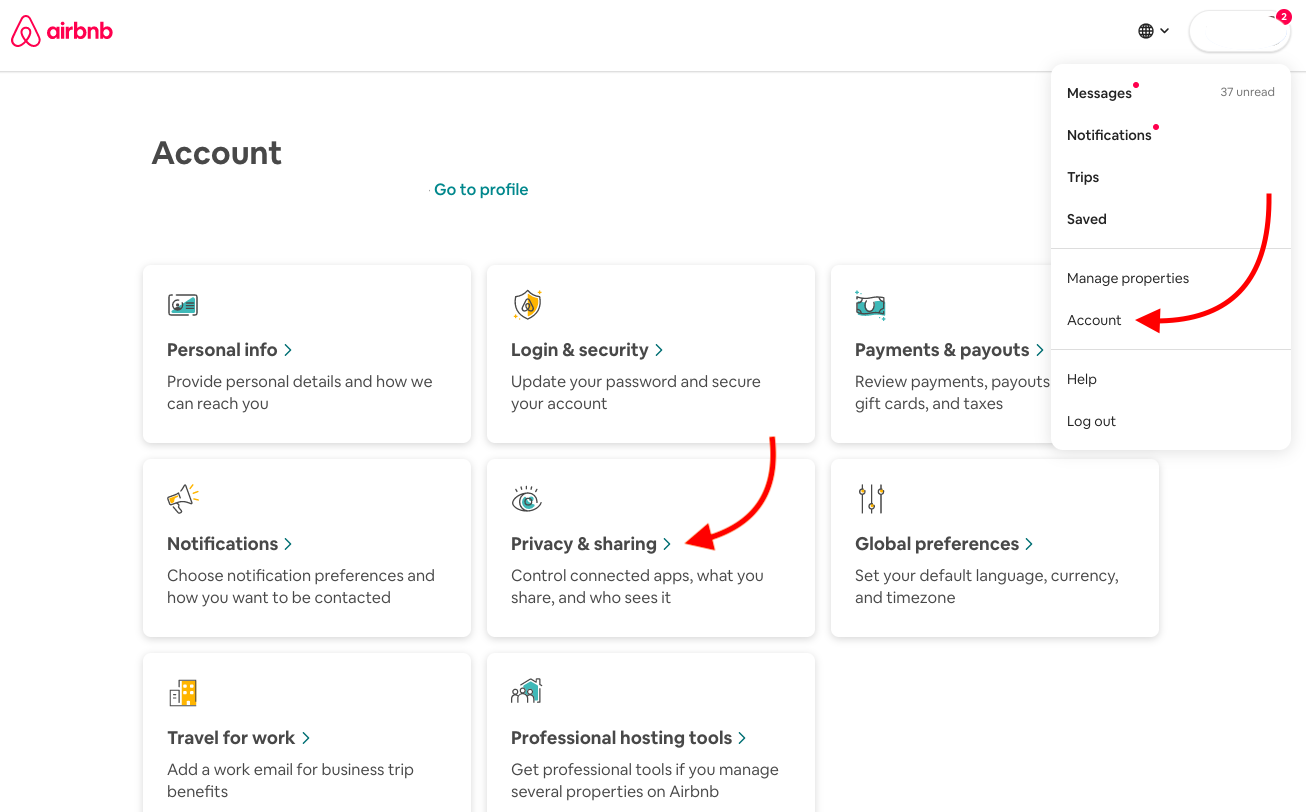
Under connected apps, click on Remove access next to the channel manager you want to disconnect from your Airbnb profile:

Historical Airbnb example: Remove access appears beside the connected app; the app name remains blurred.
Key differences between Airbnb and other OTAs
Instant booking
Connecting the Channel Manager with Airbnb will put your connected listings on Instant booking.
Regulations, taxation and fee structure
Please visit the Airbnb Help Centre to learn more about location-specific laws, regulations, and taxation in your region and Airbnb's fee structure.
Host Account structure
Airbnb's Host accounts are a slightly different concept to how accounts are handled in Channel Manager. An Airbnb Host account is linked to a person (the owner), which allows the management of rooms across multiple properties. A Channel Manager account on the other hand, is an account linked to one property.
One Airbnb Host account can be connected to multiple Channel Manager properties by following the same connection process for each property. A Channel Manager property can only have multiple listings connected to one address.
Transaction/payment processing cost
Airbnb are the merchant of record for all transactions processed on their platform. Airbnb covers all credit card fees for payments and accepts liability for chargebacks and invalid credit cards.
Listings structure
One (1) listing per room type and per rate plan needs to be created.
Listing creation
If you are new to Airbnb, you must create an Airbnb host account. However, your listings will be created via Channel Manager (no need to create them on Airbnb)
If you are already using Airbnb, you can map the Channel Manager's room rates to your existing Airbnb listing, allowing you to keep your reviews and content.
Host-centric
Airbnb guests select where they book based on a property's features and the host's profile. Your host profile is as important as your listings.
Please note: If you already have an Airbnb account with listings, confirm that you are not co-hosting these listings. Co-hosted listings cannot be connected to a channel manager.
Personalization and personality
To list on Airbnb, you must write all descriptions and titles, as none is automated. This is your chance to highlight the unique qualities of your property and differentiate yourself from the competition. The key is to be informal and personalized.
💡 Airbnb listings cannot contain any e-mail addresses, website URLs, phone numbers, emojis, repeated special characters, or words in all capital letters.
Hospitality standards
Airbnb has high standards for guest experience (minimum rating of 4.6 stars after hosting 20 guests). Properties that do not meet these standards can be suspended.
Multiple offers / promotions / discount options
Airbnb has multiple offers/discount options that can be set on its side. These do not create additional room rates to be mapped from Channel Manager, it simply modifies the price as long as certain requirements are met (e.g., long stay discounts, early bird offers, last minute offers).
Creating an AirBnb Account
Follow this link and select 'Business':
https://www.airbnb.com/business-sign-up/account-type/ph?_ga=2.227379357.1268006930.1561944319-1113269945.1543128303
After you sign up, you must complete your Airbnb host profile.
Host profile setup recommendations:
Airbnb host accounts must have a profile, which guests consider when deciding where to book.
Even if your Airbnb listings look fabulous, you're unlikely to see bookings roll in without a great host profile. A welcoming and trustworthy profile can make all the difference when convincing Airbnb guests.
- First name: put the name of the main contact followed by the property name (recommended) or simply the property name
- Surname (last name): this won't be displayed publicly. You can use the name of the city where your property is located
- Birthdate: enter the birthday of the general manager or reservation manager.
- Email: Enter the email address you want all correspondence sent to. This must be the same email you'll use to respond to messages. If your preferred email address is associated with an existing Airbnb account, you'll need to remove it from that account before attempting to add it to your new Channel Manager-connected account.
- Phone number: This must be a landline or mobile phone you can access as it will be used for verification. It cannot be an answering service.
- Profile picture: put a picture of the general manager (recommended), reception staff, or your property logo.
- Describe yourself: this is your opportunity to describe your property, philosophy, and why you think guests will have a great stay.