

Use Cancellation Analysis to compare currently active and canceled bookings for selected stay nights, inspect the supporting room stays and export the aggregate results.
The dates select nights of stay—not dates when cancellations happened. This is a current, restated view of captured bookings. It is not a cancellation-event ledger, a historical on-the-books snapshot or a measure of refunded money or lost revenue.
Before you start
Select the intended property. You need access to that property and its reports; an Org Admin role is not required solely to use this report.
Each run covers one property and one Reservation feed. The feed is the channel through which ChannelRUSH received the reservation, not necessarily its original selling source. Separate feeds can contain overlapping business; do not add their totals without reconciling those bookings.
Viewing, rerunning and downloading this report do not cancel reservations, send inventory, issue refunds or repair missing history.
Open and run the report
- Select your property in the property selector.
- Open Reports → Revenue Analytics → Cancellation Analysis.
- Set Stay dates (through inclusive) to the nights you want to analyze. You can use Month to fill a whole calendar month.
- Choose the Reservation feed you want to inspect.
- If needed, expand Narrow by product or currency and enter a Channel room ID, Channel rate-plan ID or Currency. Leave these blank for all products and currencies within the selected feed.
- Select View report.
- Check the property, feed and stay dates printed above the results.
The initial date range is 30 days beginning on the property's current local date. Both endpoints are included, but a reservation's checkout date is not a stayed night. You can select up to 366 days.
After the first run, expand Filters, change the selection and select Update report. Changing an input does not itself reload the results. Apply your changes before using CSV or paging links; those links use the last loaded selection, not pending form edits.
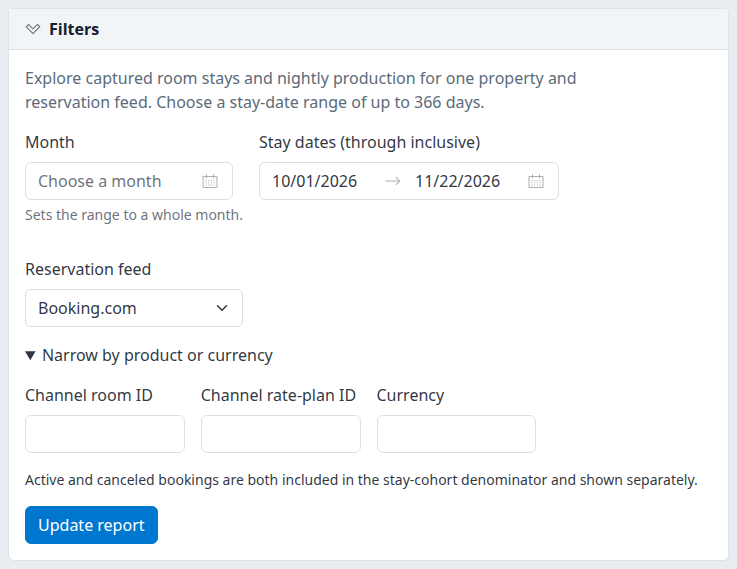
Expanded filters on a demo property. Optional product and currency fields are blank in this example.
Understand which bookings are counted
A stay cohort is the captured bookings with at least one matching room night inside your selected dates and filters. Active and canceled bookings are included and shown separately; there is no status checkbox to turn one group off.
- Active: the booking's current captured status is active. A reinstated booking is active even if it was previously canceled.
- Canceled: the booking's current captured status is canceled. Removing one room from an otherwise active booking does not make the booking canceled.
- Canceled booking dates and value: when retained history contains an earlier active version, the report uses the latest such version as one complete source for the pre-cancellation stay and prices. It does not combine different versions to fill gaps. If that version lacks usable stay dates, older or current dates are not automatically substituted.
- No earlier active version: current canceled dates can still identify matching stay nights, but canceled value remains unavailable.
The headline cancellation rate is:
Distinct currently canceled bookings with matching stay nights ÷ all distinct active and canceled bookings with matching stay nights × 100.
Bookings without usable dates or an identifiable booking record cannot be included in that dated denominator. A booking can contribute several room stays and many nights without becoming several bookings in the headline total.
The cohort can change when captured dates or statuses change. Rerunning the same URL later does not reproduce an immutable snapshot.
Check the result
Check these items before interpreting a percentage or value:
- Confirm the printed property, feed and stay dates match your question.
- Read the full-selection distinct booking and canceled-booking counts above the table.
- Check each currency separately. The report does not convert currencies or supply a combined monetary total.
- Expand Definitions and coverage to review the timing and monetary qualifications.
- Check any Source exceptions outside dated totals warning before treating the selection as complete.
- Expand Selected feed room-stay detail to examine the contributing stays.
No captured stays match these filters means this selection returned no matching captured stays. It does not prove the property had no bookings or cancellations. A dash is unavailable data, not a measured zero. With no bookings in the denominator, the cancellation percentage is unavailable even when the count is zero.
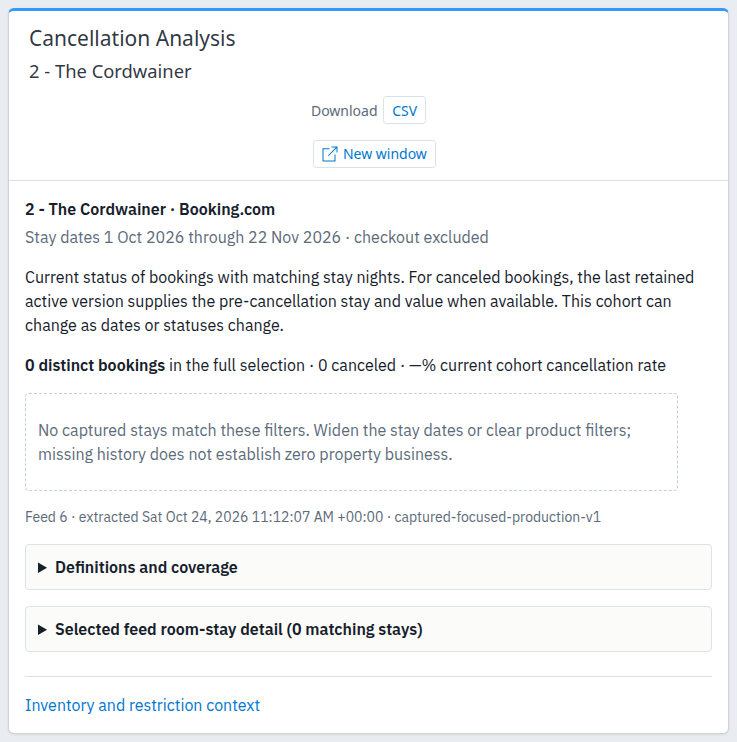
Empty demo result. The scope, export and explanation controls remain available; this image does not illustrate populated totals.
Read monetary values conservatively
Qualified monetary totals use ChannelRUSH Booking Engine room rates as booked, including any embedded tax but excluding separately stored taxes and fees. Other feeds may have priced nights without qualified monetary totals.
A qualifying night needs one unambiguous, nonblank stored nightly price and a known currency. Canceled value also needs the retained pre-cancellation source described above. A recorded zero price is a price; an absent, null or conflicting price is not zero.
Canceled booking value is the qualified pre-cancellation room-rate value of the selected nights. It is not proven lost revenue, a refund, a cancellation fee, a no-show charge or an incremental financial loss. A partially selected stay contributes only its matching nights' value.
Read timing and coverage correctly
Receipt lead days measure the interval from the first retained receipt to arrival in the property's local time. This is not the OTA's original sale time or the cancellation time. Imports and missing history can shorten the interval. Missing receipts, receipts after arrival and timestamps without a verified offset remain unknown. The mean uses only timed room stays.
Extracted identifies when that report query ran. It does not certify when the channel last supplied data or that its history is complete. Read the displayed offset with the timestamp.
The exception warning can name invalid room stays, bookings without any usable stay dates and records without a booking identity. These are outside the dated totals; some are feed-wide rather than limited to your selected dates or product filters. They can overlap. Do not add them to the cohort counts to reconstruct a property-wide total.
Inspect supporting room stays
Expand Selected feed room-stay detail (N matching stays). It shows at most 100 stays per page, ordered by arrival and then reservation and room-stay identifiers. Use Previous page and Next page when available. The headline totals and aggregate table still cover the full selection.
The detail identifies whether dates and value came from a current or pre-cancellation reservation version. “Pre-cancellation” means an earlier retained active source; it does not mean the booking was reinstated or money was recovered.
Reservation identifiers in this report are displayed as text. To investigate the reservation itself, use the separate reservation search workflow described in Review reservation details, keeping the property and feed in mind. Do not treat an older value/date source as the current reservation status.
Inventory and restriction context opens the property's rates and availability report. It does not carry this report's dates, feed or product filters; select the intended scope again there. It does not perform an inventory update.
Export or open a separate window
- Apply any pending changes with Update report.
- Select CSV beside Download.
- Check the exported property, feed, dates and extraction timestamp before comparing it with another run.
The CSV contains the full aggregate selection, not the individual room-stay detail page. It is a fresh read, so newly captured changes can make it differ from an earlier on-screen result. The filename follows cancellation-YYYY-MM-DD-YYYY-MM-DD.csv.
New window opens the current report selection in a separate, reduced-navigation window. A later filter submission or paging action can return that window to the normal application layout; the report remains a read-only view.
Filter reference
| Field | What it does | Accepted values and example |
|---|---|---|
| Month | Fills the stay-date range with a whole calendar month. It is a shortcut, not a separate grouping. | Choose the required month, then run or update the report. |
| Stay dates (through inclusive) | Selects nights inside the requested range; checkout is excluded. | Supply both dates in order, spanning no more than 366 days. A stay checking out on the first selected date contributes no nights. |
| Reservation feed | Selects one captured reservation source for the current property. | Check the selected name rather than assuming the default is the feed you want. A retained-history URL can name a feed no longer connected to the property. |
| Channel room ID | Narrows to the exact recorded channel room identifier. | Blank means all; up to 200 characters. Use the ID, not the room name, and avoid added spaces. |
| Channel rate-plan ID | Narrows matching nights to the exact recorded channel plan identifier. A night's plan takes precedence over the room-level plan when present. | Blank means all; up to 200 characters. This can retain only part of a stay when its nightly plans differ. |
| Currency | Narrows to one recorded currency without conversion. | Blank means all; surrounding spaces are removed and letters uppercased. For example, usd becomes USD. Maximum 10 characters; entering a value does not establish that the feed contains it. |
Room and rate-plan identifiers are exact matches, including case and spaces. Product filters narrow the cohort; they do not introduce product-grouped rows. This report groups its Stay cohort by currency and current status, not month, channel source or cancellation-event date.
On-screen column reference
Aggregate table
| Column | Meaning |
|---|---|
| Cohort | Stay cohort, defined by the selected matching nights. |
| Currency | Recorded currency; Unknown when absent. |
| Status | Current Active or Canceled classification. |
| Bookings | Distinct bookings represented in this currency/status row. Use the independently distinct headline total for the full selection. |
| Room stays | Distinct contributing room stays; one booking can have several. |
| Clipped nights | Matching nights within the selected date and product scope. |
| Priced / nights | Nights with one unambiguous stored price, followed by all matching nights. This is not necessarily monetary qualification. |
| Qualified nights | Nights eligible for the monetary totals described above. |
| Booked value / canceled booking value | Qualified room-rate value of the selected nights, separated by status. A dash is unavailable. |
| Qualified ADR | Qualified value divided by qualified nights—not all matching nights. |
| Night share | Share within the same feed, currency and status. With one Stay cohort bucket, a populated status row normally shows 100%; this is not the canceled share of active plus canceled nights. |
| Known value share | Share of qualified known value within the same currency and status. Unknown amounts are excluded. Normally 100% for this single bucket when the denominator is positive; unavailable otherwise. |
| Mean full LOS | Average full arrival-to-checkout length, counting each represented room stay once. It can exceed the selected interval because the nights, not the full LOS, are clipped. |
| Mean receipt lead days | Average first-retained-receipt-to-arrival interval for timed room stays only. |
| Timed / room stays | Stays with a usable receipt interval, followed by all represented stays. |
| Cohort cancellation rate | Canceled bookings divided by active plus canceled bookings within the same currency/cohort. It is repeated on the active and canceled rows; do not add the percentages. |
| Bookings using pre-cancellation versions | Bookings whose selected dates/value source is an earlier retained active version, not reinstated bookings or money recovered. |
Room-stay detail table
| Column | Meaning |
|---|---|
| Reservation | Current stored reservation-version identifier. |
| Room-stay ID | Identifier of the contributing room stay in its selected source version. |
| Channel room ID | Recorded channel room identifier; Unknown when missing. |
| Arrival | Full stay arrival date. |
| Checkout | Full stay departure date; not counted as a stayed night. |
| Full LOS | Full stay length in nights. |
| Clipped nights | Matching nights retained by your date and product selection. |
| Price rows | Count of unambiguously priced nights, despite the column's name; not a count of all raw price records. |
| Status | Current booking classification, which can be Canceled while its date/value source is an older active version. |
| Rate-plan ID | Recorded nightly plan, Mixed nightly plans when several remain, or Unknown when absent. |
| Receipt lead days | The qualified first-receipt interval, or Unknown. |
| Value/date source version | Reservation version supplying the stay and value, marked current or pre-cancellation. |
| Currency | Source version's recorded currency, or Unknown. |
| Known value | Qualified room-rate value for this stay's matching nights; a dash is unavailable. |
CSV field reference
Numbers use an invariant decimal format. Empty cells generally mean unavailable or not applicable, not zero. A real zero remains numeric zero. Text that could be interpreted as a spreadsheet formula is protected with an apostrophe.
The following are the exact export headers, in file order. Several columns belong to the shared report format and are not separate controls or measurements on this page.
| Header | Meaning in Cancellation Analysis |
|---|---|
| Contract | The export contract identifier, captured-focused-production-v1. |
| Period | Selected; this page does not load a comparison period. |
| PropertyId | Selected property's identifier. |
| FeedId | Selected reservation-feed identifier. |
| Start | First included stay date, yyyy-MM-dd. |
| End | Last included stay date, yyyy-MM-dd; checkout remains excluded. |
| View | cancellation. |
| Grouping | Shared configuration metadata, normally month. It does not make this report monthly grouped. |
| ExtractedUTC | Extraction timestamp with its explicit offset; not channel-data freshness. |
| Currency | Row's recorded currency; blank when no row or no known currency. |
| Status | Row's Active or Canceled classification. |
| Bucket | Stay cohort. |
| Bookings | Distinct bookings in the row. |
| RoomStays | Distinct room stays in the row. |
| RoomNights | Clipped matching nights. |
| PricedNights | Nights with one unambiguous stored price. |
| QualifiedNights | Nights eligible for monetary totals. |
| UnmappedNights | Nights without exactly one current property-room mapping target. This is separate from monetary qualification. |
| KnownBookedRateValue | Qualified selected-night value for either status. |
| QualifiedADR | Qualified value divided by qualified nights. |
| KnownValueSharePercent | Qualified known-value share within the same currency/status. |
| RevenueBasis | Text explaining which money qualifies and what is excluded. |
| Coverage | Text explaining the limits of captured-feed coverage. |
| RoomFilter | Applied exact channel-room filter; blank means all. |
| RatePlanFilter | Applied exact channel-plan filter; blank means all. |
| CurrencyFilter | Applied normalized currency filter; blank means all. |
| IncludeCanceled | True: both active and canceled bookings participate. |
| ComparisonAlignment | Shared metadata, normally none; there is no comparison result here. |
| UnattributedInvalidStays | Invalid-date room-stay exception count, outside dated totals. Not a count of all excluded bookings. |
| UnresolvedSourceIdentityRecords | Feed records without a usable booking identity. This can include multiple versions and is not a distinct-booking count. |
| RowState | Captured, or No captured rows for an empty selection. |
| PropertyTimeZone | Property's IANA time-zone name used for receipt timing. |
| TimingBasis | Text describing first-retained-receipt timing and its limitations. |
| MeanFullStayLOS | Average full stay length over represented room stays. |
| TimedRoomStays | Stays with usable receipt timing. |
| MeanFirstReceiptLeadDays | Average receipt interval over timed stays only. |
| RoomNightSharePercent | Matching-night share within the same currency/status. |
| CohortCancellationPercent | Currency/cohort cancellation percentage. |
| FullScopeDistinctBookings | Independently distinct booking total for the entire selection; repeated on each row. |
| FullScopeCanceledBookings | Entire selection's distinct currently canceled bookings; repeated on each row. |
| RecoveredBookings | Row's bookings using pre-cancellation versions. “Recovered” refers to historical attribution, not money or reinstatement. |
| UnattributedBookings | Feed-wide bookings with no usable dated stay in the selected source version; not restricted to the report's period and not necessarily canceled. |
| FullScopeCancellationPercent | Full-selection cancellation percentage; repeated on each row. |
| CanceledBookingValue | Repeats qualified value only for a Canceled row; blank for Active or unavailable amounts. Do not add it to KnownBookedRateValue. |
| CurrentHotelRatePlanMapping | Not applicable to Cancellation Analysis and left blank. This does not diagnose missing rate-plan mappings. |
Do not sum repeated full-scope counts or exception counts across rows. Do not add the repeated cancellation percentages.
An empty export still contains one metadata row with RowState = No captured rows. Its aggregate measures are blank, while full-scope counts and exception counts remain present. The row is not a booking, and its timestamp is not evidence of a fresh vendor observation.
Common problems
- Nothing appears before the first run: select View report. Opening the page alone displays the criteria, not a completed query.
- The results still show the old dates or feed: expand Filters and select Update report. Check the printed scope afterward; changed inputs alone are not a loaded result.
- No captured stays match: check property, feed and dates, then clear exact product/currency filters or widen the date range within the limit. If expected bookings still do not appear, ask support to investigate capture/history coverage. Empty results are not proof of zero business.
- A dash appears for value, ADR or a percentage: inspect qualified nights, feed and retained-history coverage. Other-feed monetary values, missing pre-cancellation prices and an absent percentage denominator can legitimately be unavailable. Do not replace the dash with zero in analysis.
- Night share is 100% on both Active and Canceled rows: each share has its own status denominator. Use Cohort cancellation rate, not Night share, for the canceled-booking percentage.
- A canceled booking is missing or has unknown value: its selected prior active source may lack usable dates/prices, or there may be no retained active version. Check the detail and exception warning. Do not assume missing history means no cancellation, and do not resend or alter reservations to populate this report.
- “Provide both dates” or an ordered-range warning: fill both dates, put the start before or equal to the end, and keep the inclusive range within 366 days. Then update the report.
- Invalid product/currency filter or detail-page warning: shorten the filter to the supported length, or reopen the report from the menu to leave an altered/stale paging URL. Reapply the intended scope.
- CSV and screen disagree: compare property, feed, dates, filters and extraction times. The export rereads current data and contains aggregates, not just the visible detail page. If equivalent scopes still disagree, provide both selections and extraction times to support.
For unresolved issues, provide the property, feed, stay-date range, relevant filters, extraction time with its offset and the exact warning. Keep guest names, contact details, payment details and passwords out of screenshots and messages.