

Use Channel Production & Booking Source Mix to compare captured bookings and room nights by source within one reservation feed, then export the matching totals.
A reservation feed is how ChannelRUSH received a booking. A recorded source is the source attached to that booking, which may itself be an intermediary. This report does not establish the ultimate original sales channel, combine feeds or remove duplicates across feeds.
Before you start
Sign in with access to the property you want to review. You do not need an Org Admin role for this report. Select the property before opening it, and check which reservation feed contains the business you want to analyze.
This is a current captured stay-date report. It is not a report of bookings made during the selected dates, cancellations received during those dates, or a historical snapshot of what you knew on an earlier day. It does not establish total hotel occupancy or complete property revenue.
Run the report
- Select the property in Channel Manager.
- Open Reports → Channel Analytics → Channel Production & Booking Source Mix.
- In Filters, choose Stay dates (through inclusive). Select both dates, or use Month to fill a whole month. The maximum range is 366 days.
- Select Reservation feed explicitly. The initial selection is not proof that this feed contains the reservations you need.
- If needed, expand Narrow by product or currency and enter an exact Channel room ID, Channel rate-plan ID, or Currency. Leave a field blank to apply no restriction for that field.
- Click View report.
- Check the property, transport feed and stay-date range above the result.
After a report loads, expand Filters, change the required fields and click Update report. Changing an input alone does not update the result. Each submission reads the captured data again; it does not send inventory or change reservations.
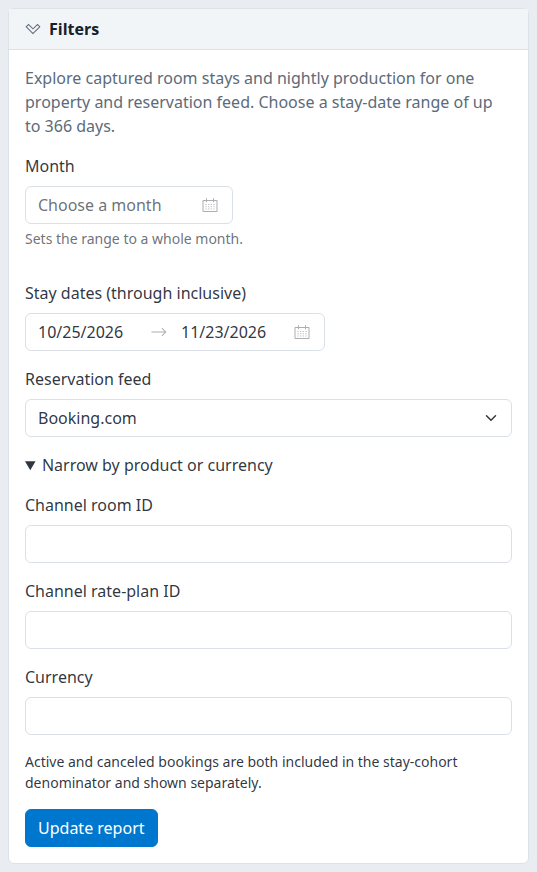
The filter form in a narrow window. Wider windows arrange controls side by side. The example uses Booking.com; select the feed appropriate to your property.
Choose the view
The menu opens Booking Source Mix. The two tabs use the same property, feed, dates and product/currency filters. Clicking a tab runs that view.
- Channel Production separates individual source identities, such as ChannelRUSH Booking Engine, Booking.com and Expedia. An unrecognized recorded identity is labeled Unclassified recorded source with its ID; a missing source can appear as Unknown original source.
- Booking Source Mix combines those identities into the reporting classes below. These are classification rules, not a guarantee about the original sale behind an intermediary.
| Class | What it includes |
|---|---|
| Direct | ChannelRUSH Booking Engine source. |
| OTA | Booking.com and Expedia sources. |
| Other (CRS interface) | ChannelRUSH CRS source; the interface alone does not establish a direct booking. |
| Unknown | Other or missing source identities. A known source name or ID is not enough to classify it as Direct, OTA or GDS. |
When a booking has a recorded source, the report uses it. Without one, it can recognize the Booking Engine, Booking.com or Expedia feed as the origin. Other feeds remain unknown rather than being assigned an assumed source.
Attribution tells you whether a row uses a recorded source, a recognized feed origin, an unknown original source, or mixed attribution evidence. Expand Source attribution, definitions and coverage to review these qualifications alongside the result.
Check and interpret the result
Check the property, transport feed and dates first. The heading gives distinct captured bookings and currently canceled bookings for the full matching selection. The aggregate table separates source, currency and status.
- The report uses each booking's latest captured version in the selected feed. Changes or cancellations can therefore change the result of a later run for the same dates.
- Stay dates include the selected final date; checkout is excluded. Only nights inside the range contribute. A stay can begin before the selected start or end after the selected end.
- Active and canceled bookings are always included, but shown separately. There is no status selector on this report.
- Canceled stays use their current captured dates. The report does not recover an earlier stay itinerary to reconstruct cancellation history.
- Currency totals are separate. There is no currency conversion, and feeds are never pooled.
No captured stays match these filters means no matching captured stays were found for this selection. It does not prove there were no bookings at the property, no channel sales, or successful reservation delivery.
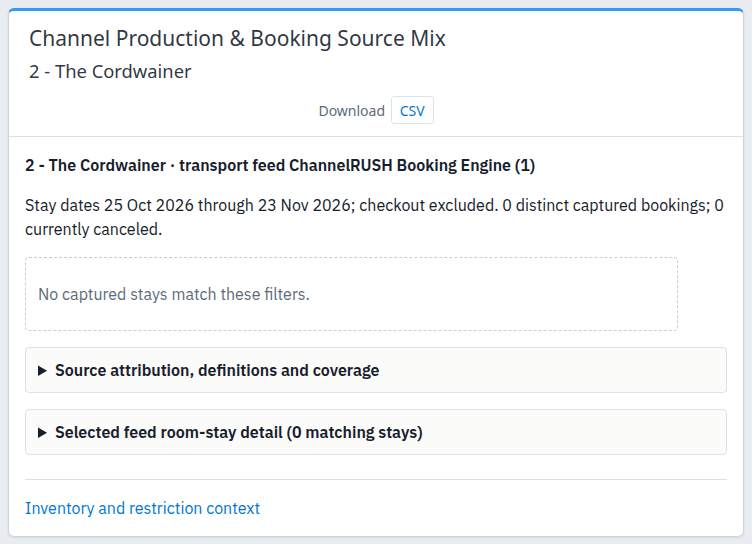
An empty demo result in the standalone window. The coverage and detail sections remain available; this is not an example of populated production totals.
Money and price coverage
A priced night has exactly one captured nightly price record with a nonblank amount. A zero price is a valid recorded amount. A missing price, duplicate price records or a blank amount is not converted to zero.
A qualified night must also come from the ChannelRUSH Booking Engine feed and have a recorded currency. Only qualified nights contribute to Known value and ADR. Other feeds can have priced nights while monetary totals remain unavailable.
Known value represents booked room-rate amounts, including tax already embedded in those rates but excluding separately stored fees and taxes. It is not realized revenue, profit, commission-adjusted net revenue or all money collected from a guest.
A dash means unavailable, not zero. Qualified zero-priced nights can produce a known value and ADR of zero. Value share is unavailable when the qualifying denominator is not positive. Missing room mappings do not, by themselves, remove valid captured nights or disqualify an otherwise qualified price.
Shares and cancellation
Booking share, night share and value share compare rows within the same currency and status. Do not read them as shares of all hotel sales or add percentages across currencies or active/canceled groups.
Current cohort cancellation is canceled bookings divided by active plus canceled bookings in the same source bucket and currency, using the currently matching stays. The same percentage can appear on both that bucket's Active and Canceled rows. It is not the percentage of cancellations received during the selected dates.
Coverage exceptions and extraction time
The coverage section reports invalid stays and records without booking identity. Invalid or missing stay dates cannot establish production in a particular stay period. Records without booking identity are a property/feed data-quality count, not necessarily records from your selected dates. These exception counts are not extra nights to add to the report.
Extracted is when the report read the captured records, not when the channel last updated them. A recent extraction does not establish fresh or complete channel data.
Inspect supporting room stays
- Expand Selected feed room-stay detail.
- Check the matching-stay count and current page.
- Use the available previous/next page controls when there are more results.
Detail shows at most 100 room stays per page, ordered by arrival and then reservation/room-stay identity. The aggregate totals above it cover the full matching selection, not only the visible detail page.
The Reservation value here is an internal captured-record reference, not necessarily the channel's booking number. This report does not provide a clickable reservation drilldown. Use Reservations → Search when you need to investigate a booking, choosing that screen's own search criteria and submitting its search.
Inventory and restriction context opens the Channels report for the current property. It does not carry this report's dates, reservation feed or product filters; set the required scope again on that screen. It is contextual navigation, not evidence that inventory caused the booking pattern.
Download or open separately
- Click CSV in the Download area to export the current view's aggregate rows. The file includes the full aggregate selection, not the paged room-stay detail. It is not an Excel workbook or a guest/reservation-detail export.
- An empty result exports a metadata row with RowState = No captured rows. Do not count it as a booking or replace its blank measures with assumed zeros.
- Downloading runs the query again. The CSV can differ from an earlier screen if captured records have changed; compare ExtractedUTC and the scope fields.
- Click New window to open the report separately while keeping the original page. It removes the ordinary navigation chrome. Subsequent tab, filter or detail-page navigation can return to normal chrome; use New window again if needed.
There is no report-specific Copy to Clipboard or Excel control on this page.
Filter reference
| Field | Meaning and accepted input |
|---|---|
| Property selector | One property you can access. Check the property printed in the result; the report is not an organization-wide total. |
| Month | Shortcut that fills a whole calendar month into the stay-date range. Submit the report afterward. |
| Stay dates (through inclusive) | Both dates are required by the form. Start must not be after end; maximum 366 inclusive days. Initially covers the property's current date and the following 29 days. Checkout is excluded from occupied nights. |
| Reservation feed | One transport feed at a time. Initially favors the connected Booking Engine feed; otherwise a connected channel is selected. Check it rather than relying on the default. |
| Channel room ID | Exact channel room identifier, not a room name or standard-property room ID. Optional; maximum 200 characters. Blank removes this restriction. |
| Channel rate-plan ID | Exact channel rate-plan identifier. Applied to the captured nightly rate-plan identity, falling back to the room-stay identity when needed. A matching stay can contribute only its matching nights. Optional; maximum 200 characters. Blank removes this restriction. |
| Currency | Exact captured currency code, for example USD or EUR. Leading/trailing spaces are removed and letters normalized to uppercase. Maximum 10 characters; this is a filter, not a currency-conversion setting. A code with no matching captured data returns no rows. |
On-screen column reference
Aggregate table
| Column | Meaning |
|---|---|
| Source | Individual source identity in Channel Production; reporting class in Booking Source Mix. |
| Class | Direct, OTA, Other (CRS interface), or Unknown under the classification rules above. |
| Attribution | Recorded source, recognized feed origin, original source unknown, or mixed evidence. Recorded source may be an intermediary. |
| Currency | Recorded currency, or Unknown when absent. Separate currencies must not be totaled together. |
| Status | Active or Canceled, based on the latest captured booking version. |
| Bookings | Distinct captured bookings represented by this row. |
| Booking share | Percentage of bookings in the same currency/status group. |
| Room stays | Distinct room stays represented by this row. The meter compares the count with the largest row, not property capacity. |
| Nights | Matching stay nights clipped to the selected date range and product filters. |
| Night share | Percentage of nights in the same currency/status group. |
| Priced / nights | Nights with exactly one recorded nonblank price, followed by all matching nights. This is price coverage, not qualified monetary coverage. |
| Qualified nights | Priced nights eligible for monetary totals under the Booking Engine feed/currency rules. |
| Known value | Sum of qualified booked room-rate amounts. Dash means unavailable. |
| Value share | Percentage of known qualified value in the same currency/status group; unavailable without a positive denominator. |
| ADR | Known value divided by qualified nights, not by all nights. |
| Current cohort cancellation | Canceled bookings divided by active plus canceled bookings in the same source bucket and currency. |
Selected feed room-stay detail
| Column | Meaning |
|---|---|
| Reservation | Internal reference for the current captured booking record. |
| Room-stay ID | Internal reference for this room stay. |
| Channel room ID | Room identifier recorded in the selected feed. |
| Arrival / Checkout | Full captured stay boundaries, not clipped to the report dates. Checkout does not count as an occupied night. |
| Full LOS | Full length of stay in nights, even when the selected range includes only part of it. |
| Clipped nights | Matching nights that remain inside the selected range and product filters. |
| Price rows | Despite the label, the count is priced nights within that clipped selection—not the total number of raw price records. |
| Status | Active or Canceled for the current booking version. |
| Recorded source ID | Source identity used by the report. It can be a recognized-feed fallback, not only an explicitly recorded source. Check aggregate Attribution before interpreting it. |
CSV field reference
These are the exact export headers, in file order. They differ from the on-screen labels. Dates use yyyy-MM-dd; numbers use a decimal point. A blank amount means unavailable. Fields retained from the shared export format do not imply additional controls on this report.
| Header | Meaning |
|---|---|
| Contract | Report definition identifier: captured-source-production-v1. |
| Period | Selected for this report. |
| PropertyId | Selected property identity. |
| FeedId | Selected transport feed identity. |
| Start | First selected stay date. |
| End | Last selected stay date, inclusive. |
| View | production or source-mix. |
| Grouping | Shared-format metadata, normally month; it does not make this report a monthly grouped report. |
| ExtractedUTC | Query extraction timestamp in UTC; not the last channel update. |
| Currency | Recorded currency; blank when unknown or when the row has no captured measures. |
| Status | Active or Canceled; blank for an empty-result metadata row. |
| Bucket | Individual source label or source-class bucket. |
| Bookings | Distinct bookings in the bucket/currency/status row. |
| RoomStays | Distinct room stays in that row. |
| RoomNights | Matching clipped nights. |
| PricedNights | Nights with exactly one recorded nonblank nightly price. |
| QualifiedNights | Nights qualifying for monetary totals. |
| UnmappedNights | Matching nights without a recognized current room mapping. These nights can still be counted; this is not a delivery-failure count. |
| KnownBookedRateValue | Sum of qualified booked room-rate values; blank when unavailable. |
| QualifiedADR | KnownBookedRateValue divided by QualifiedNights; blank when unavailable. |
| KnownValueSharePercent | Same-currency/status known-value share; blank when unavailable. |
| RevenueBasis | Explanation of the qualified monetary basis. |
| Coverage | Qualification that captured feed coverage and property-wide completeness are not established. |
| RoomFilter | Applied exact channel room filter; blank means unrestricted. |
| RatePlanFilter | Applied exact channel rate-plan filter; blank means unrestricted. |
| CurrencyFilter | Applied normalized currency filter; blank means unrestricted. |
| IncludeCanceled | True; this report always includes canceled and active business separately. |
| ComparisonAlignment | Shared-format metadata, normally none; this page has no prior-year comparison selector. |
| UnattributedInvalidStays | Invalid-stay exceptions that cannot be assigned to the selected stay period; not extra matching bookings. |
| UnresolvedSourceIdentityRecords | Records without a usable booking identity in the property/feed; not a count of unknown sales channels or a stay-date total. |
| RowState | Captured for an aggregate row; No captured rows for an empty-result metadata row. |
| BookingSharePercent | Booking share within the same currency/status group. |
| RoomNightSharePercent | Night share within the same currency/status group. |
| RecordedSourceId | Source identity when the bucket has one. Can be zero for unknown or blank when a source class combines identities. |
| SourceClass | Reporting class: Direct, OTA, Other (CRS interface), or Unknown. |
| SourceAttribution | Explanation of the source evidence used. |
| CohortCancellationPercent | Current matching cohort cancellation percentage for the same bucket and currency. |
Repeated scope and exception metadata belong to the report, not separately to every row. Do not sum those metadata fields across rows. Spreadsheet-sensitive text can carry a protective leading apostrophe in the CSV.
Common problems
No captured stays match these filters → The selected feed, dates or exact product/currency filters may not match retained data. Reopen Filters, verify the feed, clear optional narrowing and click Update report. If expected bookings remain missing, give support the property, feed, stay dates, filters and extraction time. Do not resend bookings or inventory to populate this report.
Prices exist, but Known value or ADR is a dash → Priced nights are not necessarily qualified nights. Check the feed, currency and Qualified nights. Non-Booking Engine feeds do not supply qualified monetary totals here. If Booking Engine values still appear incomplete, ask support to examine the captured price coverage; do not treat missing amounts as zero.
A source is Unknown or appears under an unexpected class → A recorded identity may be missing, unclassified or an intermediary. Compare Channel Production with Booking Source Mix and inspect Attribution. Ask support with the source label/ID and selected feed if the evidence remains unclear; do not relabel it as direct business based only on a name.
“Select an ordered stay-date range of at most 366 days.” → Correct the date order or reduce the range, then submit again. For an incomplete range, supply both dates. The error is not a completed report.
“Invalid product or currency filter.” → Shorten the room/rate-plan identifier to at most 200 characters or the currency filter to at most 10, verify the exact identifier and submit again. Clear the filter if you do not know it.
Populated totals but empty room-stay detail, or “Invalid detail page.” → A copied or old URL may point beyond available detail. Reopen the report from Reports, reapply the filters and run it from the first page. If the mismatch persists, provide support the report URL, scope and extraction time.
CSV and the screen differ → Check view, feed, dates and narrowing first. CSV contains aggregates rather than paged detail and is read again at download time. Run the report again and compare timestamps. If identical scope still produces an unexplained discrepancy, send support the relevant aggregate rows and timestamps, without passwords, payment details or unnecessary guest data.