

Use Channel Net Revenue to compare captured booking value with recorded commission, and see which bookings have enough compatible information to calculate net value.
This report covers one property and one reservation source at a time. It is not settled revenue, profit, full return on investment, or a complete statement of distribution costs. Missing commission is not zero cost.
Before you start
Sign in with access to the property you want to review. You do not need an Org Admin role solely to read this report.
Decide which reservation source and first-arrival period you want. A preselected source is not evidence that it contains the bookings you need. Sources can have different amounts and commission coverage; do not add overlapping feeds together as if duplicate business had been removed across them.
Run the report
- Select your property in Channel Manager.
- Open Reports → Channel Analytics → Channel Net Revenue.
- In Filters, choose First arrival dates (through inclusive). Select both dates, or use Month to fill a complete calendar month.
- Select Reservation source explicitly.
- Leave Currency blank to keep currencies in separate groups, or enter the booking currency you want, such as
USD. - Select Include canceled business separately if you also want canceled bookings. They remain separate from active business.
- Click View report.
- Check the property, source and resolved dates above the results before interpreting amounts.
If you leave both dates blank, Rolling days is used instead. It defaults to 30 and starts on today in the property's time zone, moving forward—not backward. The range includes today. Explicit start and end dates take precedence.
To change a completed report, reopen Filters, change the inputs and click Update report. Editing an input alone does not update the displayed results. This report reads captured data; it does not send inventory, change reservations or add commission charges.
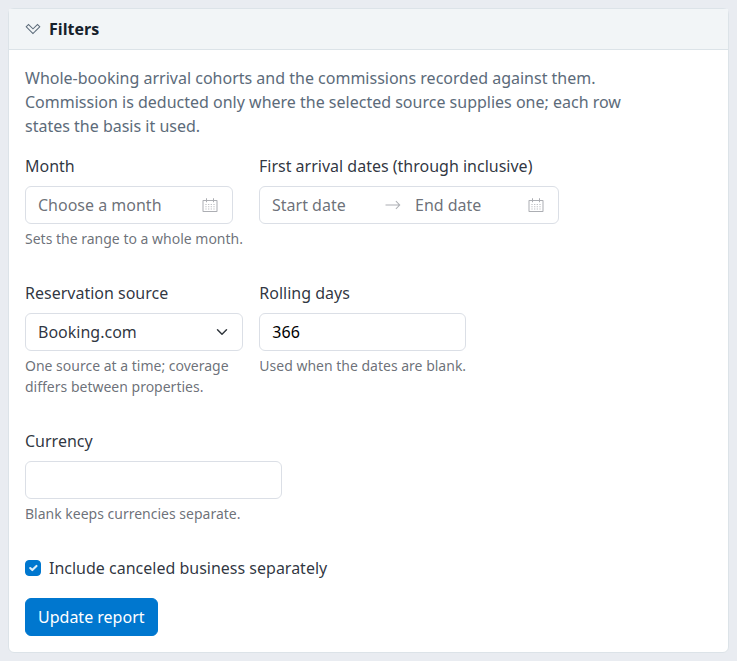
Example after loading a report: Booking.com, 366 forward-looking days and canceled business included. These are example selections, not the initial defaults.
Check the result
The result heading identifies the source, resolved period, requested property and Extracted time. That time is when the report queried the stored data, with the displayed time-zone offset. It is not the last time the channel sent a reservation or proof that all channel bookings have arrived.
Open Meaning and coverage for the report's interpretation notes.
- Read Known value as the subtotal of available booking values, not necessarily the value of every counted booking.
- Read Recorded commission as recorded cost evidence. Its presence alone does not establish that a deduction is qualified.
- Read Known net value / coverage together. Net covers only the qualifying subset; coverage tells you how many bookings qualified.
- An em dash (—) means unavailable, not zero. A genuine recorded zero can be valid information.
- No matching captured business means no captured bookings matched this selection. It does not establish zero property business.
For another property or source, run a separate report and retain its selection context. Keep different currencies, active/canceled groups and amount bases separate when comparing results.
Understand the date and booking basis
The report selects each booking's latest captured version before applying the date and status filters. A newer cancellation or arrival change can therefore change an earlier report's results. This is not an historical “as of” snapshot.
A booking is included when its first known room arrival date falls inside the selected period, including both endpoints. Once included, the report counts all its room stays, valid full-stay nights and full booking value—not only nights inside the period.
For example, a booking first arriving before your selected period is not included merely because it stays into that period. A booking first arriving inside the period can include nights after the end date. For nightly on-the-books analysis, use the separate Daily Revenue / OTB guide.
Bookings without a usable channel booking identity or any known room arrival cannot establish this report's cohort. Missing or reversed room dates contribute no nights and can appear in the invalid-room-stay count. Nights are not occupancy or available rooms.
When a net deduction is qualified
The current qualified deduction is for Mirai bookings. It requires all of the following:
- A known, nonnegative booking value.
- A known, nonnegative reservation-level commission amount.
- A known booking currency.
- A commission currency matching that booking currency.
For qualifying bookings, net is booking value minus reservation-level commission once. Mirai's stored commission is calculated from the percentage supplied by Mirai; the report does not invent a standard commission percentage.
An explicit zero commission can qualify. An unknown commission cannot. A recorded commission greater than booking value can produce negative net; the report does not replace that result with zero.
For other sources, recorded amounts may still appear, but the report does not calculate a qualified net deduction. In particular, an Expedia supplier amount is not treated as a gross amount from which commission can automatically be deducted again. Check Currency / basis rather than assuming all source values mean the same thing.
Reservation and room commission evidence
When a reservation-level commission is available, the report uses it and does not add room commission amounts to it. Otherwise, a complete set of room commission amounts may be shown as a recorded sum. That room sum does not qualify for net deduction.
The count of bookings with a recorded cost amount is therefore different from the count of qualified net bookings. Currency compatibility and the source's amount basis still matter.
Read coverage correctly
Coverage is the percentage of bookings in the group that qualify for net deduction. It is based on booking counts, not revenue weighting or the percentage of all channel bookings captured.
The compatible booking value beneath the net amount is the booking-value subtotal for that same qualified subset. Do not subtract all displayed recorded commission from all displayed known value to reconstruct net: those totals may cover different bookings or currencies.
Summary column reference
The summary covers the full selection, independently of the current booking-detail page.
| Column | Meaning |
|---|---|
| Property / status | Property name and Active or Canceled grouping, with property location beneath. Selected scope total is a total row, not another property. |
| Currency / basis | Booking currency and the source amount basis. Unknown currency means the report cannot identify a currency for safe aggregation. A Mirai basis label alone does not prove every booking in the row qualifies. |
| Bookings / stays / nights | Booking count, room-stay count and valid full-stay night count, in that order. These are not guest counts or occupied physical rooms. |
| Known value | Sum of available nonnegative booking values where booking currency is known. It can be a partial subtotal. |
| Recorded commission | Sum of available selected commission amounts where commission currency is known. The column also names that currency, the number of bookings with a recorded cost amount and invalid room stays in the cohort. |
| Known net value / coverage | Qualified net subtotal, qualified bookings out of all bookings in the group, the count-based percentage and the compatible booking-value subtotal. |
Currencies, commission currencies, statuses and amount bases remain separated. Do not add property rows and Selected scope total rows together: that double-counts the same business. There is no currency conversion or subtraction of canceled totals from active totals.
Booking-detail reference
When matching bookings are available, Booking detail shows up to 100 per page. Use the previous/next page controls beneath the report when available. The full summary is not restricted to those visible detail rows.
| Column | Meaning |
|---|---|
| Reservation row / arrival | ChannelRUSH's internal reservation-version row ID and the booking's first known room arrival. This ID is not the channel confirmation number; the cell is not a reservation-opening link. |
| Status / units | Active or Canceled, room stays and full-stay nights. |
| Booking value | Available stored booking value and its currency. A visible number with no currency is not a safely qualified monetary total. |
| Recorded commission | Available reservation amount or complete room sum, with the recorded commission currency. |
| Known net | Booking value less commission when qualified; otherwise —. |
| Coverage | The qualification result, followed by how commission evidence was selected. |
Coverage messages
| Message | Interpretation and next check |
|---|---|
| Feed deduction basis unqualified | This source is not qualified for net deduction. A visible amount is not permission to deduct it again. |
| Missing booking value | A usable booking value is unavailable. Review the captured reservation information before comparing monetary results. |
| Missing commission | No usable reservation commission or complete room commission sum is available. Do not treat it as zero commission. |
| Commission currency or authority unqualified | An amount exists, but its currency or reservation-level authority does not satisfy deduction rules. Check for missing/mismatched currency or room-sum-only evidence. |
| Stored supplied-percentage commission deducted once | The captured booking meets the current deduction rules. This does not establish payment, settlement or all other distribution costs. |
These messages give the first applicable explanation, not a complete list of every data issue. The cost-source text distinguishes Reservation amount (room rollup not added), Complete room sum; currency/basis unqualified, and Unknown / incomplete.
Download or open separately
- Run the report and check its selection context.
- In the Download group, select CSV.
- Open
channel-net-revenue.csvand check its source, property, dates, status option and extraction time.
CSV contains the complete aggregate summary, including totals. It is not an individual-booking export, even when Booking detail is displayed. Paging changes the visible detail, not the aggregate export's scope.
The download queries stored data again. Newly captured versions can change results between viewing and downloading. Keep the CSV's context and extraction time with your analysis.
Select New window to open the current report separately. Check the selected property and filters again after further navigation; do not assume the separate-window layout is retained by every update or page link.
Filter reference
| Control | Values and behavior |
|---|---|
| Month | Fills the start and end with a whole calendar month. Click the report submit button afterward. |
| First arrival dates (through inclusive) | Supply both dates or leave both blank. Start must not follow end; the inclusive range is at most 366 days, within years 2000–2100. |
| Reservation source | One source at a time. The normal choices come from the property's connected channels; a source retained in an existing report link can also remain available after disconnection. Choose deliberately. |
| Rolling days | Whole number from 1 to 366; default 30. When both dates are blank, starts today in the property's time zone and extends forward. Keep a valid number even when explicit dates are supplied. |
| Currency | Blank means separate currency groups. Otherwise matches the booking currency after trimming spaces and ignoring letter case. Maximum 10 characters; an unrecognized code can return no rows rather than a validation error. This is not a currency-conversion control. |
| Include canceled business separately | Initially unchecked. Checked adds canceled bookings as separate groups alongside active business; it is not canceled-only selection. |
| View report / Update report | Runs the selected read-only report. Updating starts booking detail at its first page. It does not save a scheduled report. |
CSV field reference
The file uses a shared schema. Some fields are not calculated for Channel Net Revenue. Zero in an unused field is not evidence of healthy pricing, mapping or booking capture. Unavailable money is blank in CSV rather than the screen's em dash.
Selection and extraction fields
| Header | Meaning in this report |
|---|---|
Contract |
Report definition identifier, supplied-commission-booking-value-v1. |
ScopePropertyIds |
Selected property ID. |
FeedId |
Selected reservation source ID. |
StartDate |
Resolved inclusive first-arrival start, yyyy-MM-dd. |
EndDate |
Resolved inclusive first-arrival end, yyyy-MM-dd. |
IncludeCanceled |
Whether canceled business was included separately. |
CurrencyFilter |
Entered booking-currency filter; blank means no currency narrowing. |
CountryFilter |
Unused here; blank for ordinary requests. |
CityFilter |
Unused here; blank for ordinary requests. |
OpportunityDays |
Shared setting, normally 30; it does not define this report's booking period or query opportunities. |
OpportunityLanguage |
Report culture metadata; there are no opportunity rows in this report. |
ExtractedUTC |
Query extraction timestamp in ISO format. Respect the included offset; this is not channel-data freshness. |
Group, count and amount fields
| Header | Meaning in this report |
|---|---|
RowKind |
Property, Total, or an empty-result marker, No matching rows. |
PropertyId |
Property ID on property rows; 0 on totals. The total is not a property with ID 0. |
PropertyName |
Property name or Selected scope total. |
Country |
Property country; blank on totals. |
City |
Property city; blank on totals. |
Currency |
Booking currency, or blank when unknown. |
CommissionCurrency |
Recorded reservation commission currency, or blank when unknown. |
Status |
Active or Canceled. |
Basis |
Source amount description; not a guarantee every booking qualified. |
Bookings |
Included booking count. |
RoomStays |
All room stays belonging to included bookings. |
RoomNights |
Valid positive full-stay nights, not clipped to the selected period. |
PricedNights |
Unused zero placeholder; not measured here. |
QualifiedNights |
Unused zero placeholder; not measured here. |
UnmappedNights |
Unused zero placeholder; not a mapping-health check. |
KnownValue |
Available booking-value subtotal where currency is known. |
ADR |
Unused; blank. |
RecordedCommission |
Available chosen commission subtotal where commission currency is known. |
BookingsWithCostAmount |
Bookings with a selected recorded cost amount, even if deduction is unqualified. |
QualifiedNetBookings |
Bookings that satisfy the net-deduction rules. |
QualifiedBookingValue |
Booking-value subtotal for the qualified subset. |
QualifiedNetValue |
Net subtotal for that subset. |
QualifiedNetCoveragePct |
Qualified booking count divided by all bookings in the group, expressed as a percentage. |
InvalidRoomStays |
Room stays with missing or invalid dates within included bookings. |
MissingIdentityRowsFeedWide |
Unused zero placeholder. Zero does not establish that every captured booking has a valid identity. |
Unused opportunity fields
OpportunitySource, OpportunityType, OpportunityLevel, OpportunityCount and LatestOpportunityCreated are blank. Channel Net Revenue does not populate opportunity rows.
For an empty report, the No matching rows record retains selection/extraction metadata; the group and amount fields are blank. Do not convert those blanks into measured zeros. Choose either property rows or total rows for summation, and retain the currency, commission currency, status and basis partitions.
Common problems
- No matching captured business: first check property and source. Check whether you intended first-arrival dates rather than stay overlap, and remember that blank dates look forward. Review the canceled option and currency filter, then click Update report. If an expected booking is still absent, give support the property, source, period and a suitable reservation reference—without guest or payment details.
- Known value exists but Known net is unavailable: check the detail's Coverage message. The source may be unqualified, commission may be missing, or currency/authority may not match. Do not enter an assumed commission or interpret the missing net as zero. Escalate conflicting captured evidence to support.
- Totals differ from another report: compare first-arrival versus stay-date selection, latest captured versions, status, source and currency. This report includes full booking amounts and full-stay nights. If those bases match and the difference remains unexplained, include both reports' selection context and extraction times in your support request.
- “Provide both dates or leave both blank.”: complete or clear both endpoints, then rerun.
- “Select an ordered date range of at most 366 days.”: correct date order, shorten the inclusive range and use supported years, then rerun.
- “Check report filters, page and output.”: reopen the report from its normal menu and enter the selection again. A malformed or hand-edited URL can request an invalid page or output. If the ordinary form still fails, send support the error text and non-sensitive report context.
- A narrow-screen table is wider than the page: scroll within the table to reach all columns. Do not infer missing values from columns that are offscreen.
For support, include the property, source, resolved dates, currency filter, canceled-business option, extraction time with its offset, and relevant Coverage text. Never send passwords, payment-card details or unnecessary guest information.