

Expedia Support
Expedia Help & Support
https://apps.expediapartnercentral.com/lodging/help/overview
How to contact Expedia Customer Support via Partner Central or phone.
You can contact Expedia Support through your Expedia Partner Central account, or by calling Expedia at +1 888 397 1786 (toll free) (United States of America).
Contacting Expedia via Partner Central
• Login to Expedia Partner Central with your SYS credentials (these credentials were created for you by Expedia Integration team during the last stage of certification).
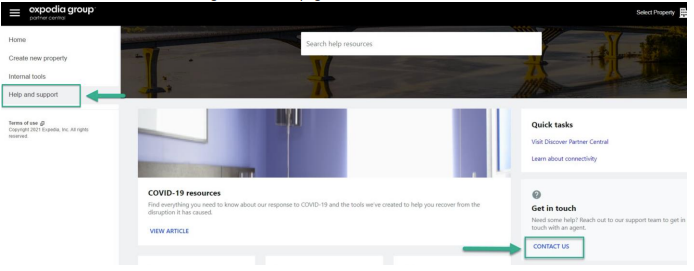
• Click on the “Help and Support” on the left side menu of your Partner Central dashboard.
• Next click on “Contact us” on the right side of the page.
• From here, if you have an issue with charging a virtual card, you can select 'Payments to or from Expedia Group', or another category that best suits your question.
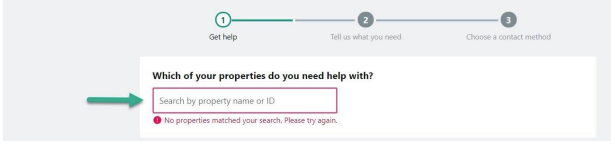
• Enter the Hotel ID on the next page asking “Which of your properties do you need help with?”
If you are already logged into one of the properties from the dashboard, this section will not be shown.
Activating ChannelRUSH as your Channel Manager in Expedia
To activate ChannelRUSH as your Channel Manager in Expedia's Partner Central, follow the following steps.
- Login to your account on Expedia's Partner Central
- Load the specific property you are looking to connect
- On the left-hand side, click on 'Rooms and Rates'
- Once the menu expands, click on 'Connectivity Settings'
- If you are currently connected with a different provider, disconnect them
- Then reconnect by searching for 'ChannelRUSH' and connect for 'Availability and rates' and 'Reservations'.
FAQ
No Email With Reservation Delivery
The guest email in the booking xml is set at the property/hotel level in Partner Central. It is disabled by default, and can be enabled in Partner Central for each property.
Restrictions Not Updating
SUMMARY
Updates regarding Min Nights, CTA, CTD, etc, are being processed successfully and appear successful in the Expedia extranet, but when a customer tries to book on Expedia.com the stay is not available.
One example is Min Nights - Min Nights = 1 is being processed successfully for dates, but one cannot book a 1-night stay on Expedia.com for those dates.
Rate plans can have default restrictions set that override any update received. So this rate plan might have a 'Min Nights = 3' minimum restriction set.
INFO
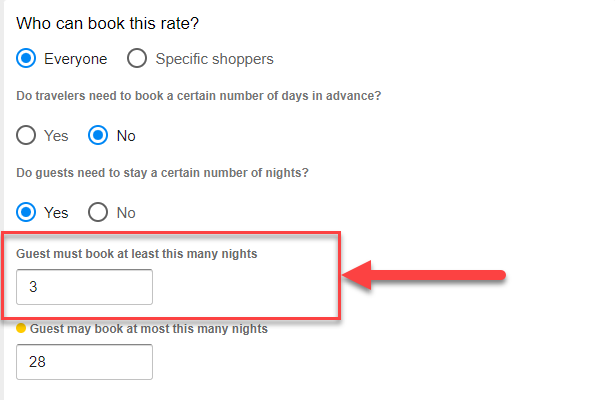
Existing Expedia example: the highlighted minimum stay is 3 nights.
ACTION
In Expedia Partner Central (or by contacting your Expedia rep) - determine if a minimum restriction is set, and if so remove it (or reduce it, i.e. Min Nights = 3 to Min Nights = 1).
Once this configuration change has been completed, the updates issued via the channel manager will take precedence, and work correctly.
Occupancy Rates Over 20 Occupants
While you can create a room type in Expedia with a Max Occupancy of 24, you can only update through 20 occupancies individually.
Occupancies after 20 automatically apply the extra-person fees, which can be configured in Expedia Partner Central.