

Use Internal Rate Consistency and Inventory Discrepancies to compare requested channel values with stored report values and identify what needs investigation.
Before you start
You need access to the selected property and a configured channel that supports outbound inventory.
These are read-only inventory reports. Running them does not send updates, retry requests or check the channel's live extranet. Stored report values can come from outgoing updates; agreement does not prove what travelers see online.
Run the report
- Select the property in the property selector.
- Open Reports → Diagnostics → Internal Rate Consistency for rates, or Inventory Discrepancies for rates, availability and restrictions.
- Choose one Channel.
- Set Inventory dates to an inclusive range of 1–31 days. Leaving both dates blank uses today through six days ahead in the property's time zone.
- Leave Room mapping ID (0 = all) and Rate mapping ID (0 = all) at 0, unless you know the channel mapping IDs to investigate. IDs appear in report rows and Mapping Coverage; they are not the channel's external room codes.
- Leave State at All states for the first run.
- Choose a Field, or leave All fields selected.
- Click View report.
To change a completed report, expand Filters, adjust the selection and click Update report. The two view tabs retain the loaded filters. Inventory Discrepancies does not automatically hide consistent rows: select Different values or Pending difference to narrow the results.
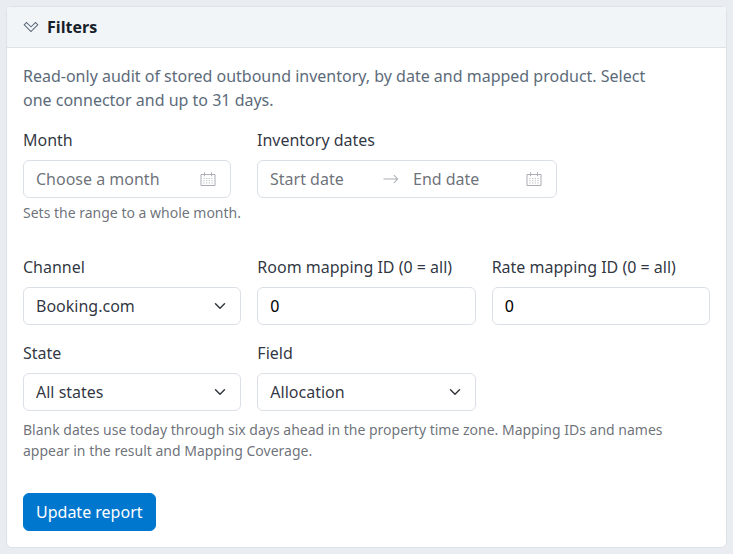
Example: Inventory Discrepancies filtered to Allocation. Update report applies changes after the first run.
Check the result
Confirm the channel, inventory dates and filtered field-row count above the table. Each row represents one field for one product and date—not one update request. Product names include mapping IDs; enabled/setup labels describe current configuration.
- Requested image: stored channel-specific values, including adjustments such as markup, rounding and occupancy rates.
- Report image: stored distribution values, which may come from sent updates rather than an independent channel check.
- Raw master context: internal rate information for reference, not proof of the original input used for that request.
- —: unavailable evidence, not zero or unrestricted selling.
Stored report values currently have no currency label, so monetary rate differences cannot be calculated. Availability and restriction comparisons remain available.
Understand the state
| State | Meaning and next step |
|---|---|
| Consistent | Comparable stored values agree within the applicable tolerance. This is not live channel confirmation. |
| Different values | Comparable stored values differ, with no matching pending work recorded. Investigate before changing inventory. |
| Pending difference | Values differ and matching product/day work is pending or processing. The count does not prove that this particular field is queued. |
| Unknown | A requested or report value is missing. Check scope and mapping coverage rather than treating the blank as zero. |
| Currency not comparable | Rate currency evidence is missing or incompatible. Visible amounts alone cannot establish parity. |
| Unsupported | The connector does not declare support for this field at that product level. |
| Not applied | The field is supported by the connector but not applied under the current property/product configuration. |
Pending / stored timing repeats product/day request counts across fields. Do not add them together as unique updates. Report image predates requested image compares stored edit times only; it does not establish a failed or overdue update.
Extracted is the report run time with its displayed offset. Stored edit timestamps are shown as recorded, not converted into a guaranteed user-local time. Neither identifies the latest independent channel check.
Export or continue investigating
Use the page controls to move through results; each page shows up to 100 rows. CSV reloads and exports the full filtered table within the report's limits, so it may differ from an earlier screen. An empty export contains a No matching rows record.
Use Mapping Coverage to investigate mappings, or Channel Health to inspect queued work and retained failures. Do not resend solely because this report shows a difference.
Common problems
- No rows match: clear State/Field filters and check mapping IDs and dates. Rates-only views cannot show Allocation or restriction fields. The shared Restriction recorded states belong to Restriction Coverage, not these views. An empty result does not prove healthy distribution.
- Date or size error: use ordered dates within 2000–2100 and shorten the range or select fewer mappings. The report allows at most 500 products, 3,100 product-days and 100,000 filtered field rows. If a small valid selection still fails, send support the error text.
- Channel unavailable or configuration missing: check the property and its channel setup. A channel appearing in the dropdown does not guarantee outbound-inventory support. Ask your administrator or support if the intended channel remains unavailable.
For unexplained findings, send support the property, channel, mapping IDs, inventory dates, filters, extraction time/offset and error text. Do not include passwords, payment details or guest information.