

Use the Performance Report to compare captured reservation activity, whole-stay room nights and after-tax booking amounts by receipt date or arrival date.
This is a booking analysis, not a statement of earned revenue or complete property production. The two tabs select different groups of reservations. They can include the same booking, so do not add their totals together.
Before you start
Select the intended property. You need access to that property's reports. The report uses reservations already captured in ChannelRUSH; it does not retrieve missing bookings from a channel, resend reservations or change inventory.
The channel list offers connections configured both to send inventory and to receive or monitor reservations. A historical or receive-only feed may not appear. All channels means all offered choices when the list contains choices—not necessarily every feed with stored reservations.
Run the report
- Select your property in the property selector.
- Open Reports → Overview → Performance Report.
- Set Date Range. A fresh visit normally starts with the property's current calendar month. Use Month / Year to fill a complete month, or select your own start and end dates.
- Open Channels and check the feeds you want. All offered channels start selected. Select all selects or clears the offered list; when choices are available, leave at least one checked.
- Select View Report.
- Check the property, dates and Reservation feeds line under How to read this report.
- Choose Currency for revenue and ADR, if results are available.
- Select By Version Receipt Date or By Arrival Date to choose the chart basis.
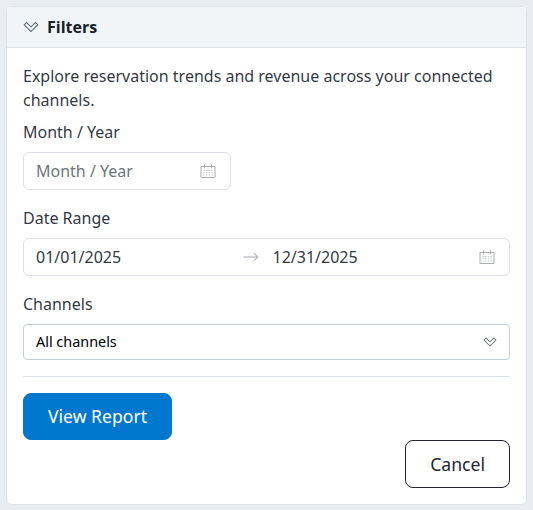
The controls stack on a narrow screen. Selecting dates or channels does not run the report; select View Report.
After a data-bearing run, Filters collapses. Reopen it to change dates or channels, then select View Report again. Changing a filter alone leaves the previous results in place. If you type dates, leave the field and check both displayed endpoints before submitting; use the displayed date format rather than pasting an ISO date string.
Changing the currency or chart tab updates the already loaded result immediately. It does not fetch newer reservations. A new report run starts on By Version Receipt Date again. Cancel returns to Reports; it is not a reset or undo control.
Check what the result represents
By Version Receipt Date
This group contains the latest captured version of each reservation whose receipt timestamp falls in the selected period. A later modification or cancellation can change that version and move the reservation out of an earlier receipt period.
Reservations Booked therefore does not mean only original new sales made during the period. Receipt can differ from the channel's original sale time. The report is not a historical “as of” snapshot or a booking-pickup calculation.
By Arrival Date
This group contains reservations with at least one room arriving in the selected period. It includes the whole reservation's rooms and nights, including nights outside the selected dates.
For a multi-room booking with different arrival dates, the arrival charts use the first captured room's arrival date, which need not be the room that matched your date range. A plotted arrival can therefore fall outside the selected period. If the first room has no arrival date, the chart uses the reservation version's receipt date instead.
What both tabs include
- Noncanceled reservations contribute to ordinary booking counts, nights, amounts and patterns. Canceled reservations are counted separately in the summary.
- Room nights cover each room's whole stay: checkout minus arrival, with checkout not counted as a night. Missing or nonpositive stay lengths do not add nights.
- The same reservation can qualify for both tabs. Their totals are separate views, not quantities to combine.
- A result shows captured data for the selected property and feeds. It does not establish that every booking was received or delivered successfully.
- There is no displayed report extraction timestamp or latest channel-update timestamp. Rerun View Report to read current captured data; a later run can differ.
The receipt filter uses the property's timezone to select its date window. Do not assume the daily chart labels or Receipt to Arrival (Days) use the same local-day boundary. For exact near-midnight reconciliation, ask support to check the receipt timestamp and property timezone rather than treating a one-day difference as a missing reservation.
Read money and currency safely
Currency for revenue and ADR changes monetary cards and charts only. Counts, room nights, length of stay and other nonmonetary measures continue to include all selected currencies. There is no currency conversion or combined-currency total.
The initial currency is an available recorded currency, not necessarily your property's preferred currency. Check it on every run. A currency can appear because it has only arrival-period business or only canceled bookings; its receipt-based revenue card can legitimately be zero.
Currency unknown means the reservation's currency was missing. These bookings remain in the counts, but monetary cards show a dash and monetary charts have no amounts. It is not an “all currencies” option.
Revenue uses captured after-tax amounts. Reservation totals drive the summary and channel/time charts; room totals drive room-type charts. These amounts can differ, and missing amounts are treated as zero. A zero is therefore not proof of a free stay or no monetary value. Amount definitions can differ between channels; the report does not establish settled revenue, commissions, profit, refunds or accounting revenue for nights within the range.
ADR divides the selected currency's captured amount by that currency's room nights. Do not divide a selected-currency revenue card by the all-currency Room Nights card to reproduce ADR.
Summary card reference
The cards do not switch their date basis when you change tabs. Only Arrivals in Period and Room Nights (Arrivals) use the arrival group; the other cards use the receipt group.
| Card | What it means |
|---|---|
| Room Nights | Whole-stay nights across all rooms in noncanceled receipt-period reservations, across all currencies. |
| ADR | Selected-currency after-tax receipt-period amount divided by that currency's whole-stay room nights, rounded to two decimals. Zero when there are no contributing nights; a dash when currency is unknown. |
| Revenue | Selected-currency after-tax receipt-period reservation totals, excluding canceled bookings. The card displays whole currency units; missing amounts can contribute zero. |
| Room Nights / Booking | All-currency receipt-period room nights divided by noncanceled reservations, rounded to one decimal. This is nights per booking across all its rooms, not average stay length per room. |
| Receipt to Arrival (Days) | Average calendar-day interval from the selected version's receipt to its first room's arrival. Missing first-room arrival is omitted; negative intervals count as zero. Rounded to one decimal. It is not proven original-sale lead time. |
| Cancellation Rate | Currently canceled receipt-period reservations divided by all receipt-period reservations, as a percentage rounded to one decimal. This is not the percentage of stay nights canceled or a history of cancellation events. |
| Reservations Booked | Noncanceled reservations whose latest captured version was received in the selected period. A multi-room booking counts once. |
| Arrivals in Period | Noncanceled reservations with at least one room arriving within the range. This counts reservations, not arriving rooms. |
| Room Nights (Arrivals) | Whole-stay room nights across all rooms in the arrival group, including nights outside the range. |
| Cancellations | Currently canceled reservations whose latest captured version falls in the receipt period. |
A report containing only cancellations can show a cancellation count and rate while its ordinary charts remain empty. A report with arrival business but no receipt-period business can show arrival totals alongside zero receipt cards. Neither is automatically a loading failure.
Chart reference
Choose the date tab before interpreting a chart. Hover over a plotted bar or point to inspect its value. Channel and product labels come from captured feed information; they are not a guarantee that similarly named products from different channels are equivalent.
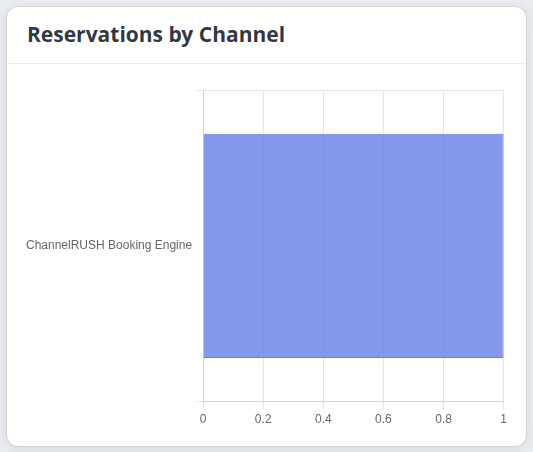
Example from the By Arrival Date tab in the demo property. The chart counts reservations, not rooms or nights.
Channel Performance
| Chart | Meaning |
|---|---|
| Reservations by Channel | Noncanceled reservation count by channel name, across all currencies. |
| Room Nights by Channel | Whole-stay room nights by channel, across all currencies. |
| Revenue by Channel | Selected-currency reservation-level after-tax amounts by channel. |
| ADR by Channel (Average Daily Rate) | Each channel's selected-currency amount divided by its same-currency room nights. Channels without contributing nights are omitted. |
| Average Length of Stay by Channel (Nights) | Average positive stay length per room, across all currencies. This differs from the summary's Room Nights / Booking denominator. |
Room Type Performance
| Chart | Meaning |
|---|---|
| Revenue by Room Type | Selected-currency room-level after-tax amounts grouped by captured channel room name, or room code when no name is available. Unknown Room Type means neither is available. |
| ADR by Room Type | That room-name group's selected-currency room amount divided by its corresponding room nights. Groups without positive nights are omitted. |
Identical room names across channels can combine in one group. The room charts do not use the reservation-level total as a substitute for missing room amounts. Their totals need not match Revenue by Channel or the summary.
Trend Analysis
| Chart | Meaning |
|---|---|
| Reservations Over Time | Noncanceled reservation counts by version receipt day or first-room arrival day, depending on the tab. Counts include all currencies. |
| Revenue Over Time | Selected-currency whole-reservation amounts assigned to those receipt or arrival days. It is not revenue earned on each night of stay. |
| ADR Over Time | Each plotted date group's selected-currency amount divided by the whole-stay nights attached to that group. |
Dates without matching noncanceled reservations are omitted rather than filled with zero. Lines connect the available points; they do not demonstrate intervening daily activity. Labels show month and day without a year, so keep the selected range in view when comparing a period spanning years. Monetary and count charts can have different dates because the former use one currency.
Booking Patterns
- By Version Receipt Date → Lead Time Distribution (Days Before Arrival): groups bookings by the first room's arrival day minus the selected version's receipt day. Same Day also includes negative intervals. The other groups are 1–3 Days, 4–7 Days, 8–14 Days, 15–30 Days, 31–60 Days and 60+ Days. Despite the final label, 60 belongs in 31–60 Days; the last group starts at 61. Missing first-room arrivals are omitted.
- By Arrival Date → Arrivals by Day of Week: groups noncanceled reservations by the first captured room's arrival weekday. When that arrival is missing, it uses the receipt date. It does not count each arriving room separately.
Rate Plan Performance
Top Rate Plans by Reservations shows the ten largest captured rate-plan-name groups. Despite the title, it counts room records, not distinct reservations: one multi-room reservation can contribute more than once. It falls back to the captured plan code, then Standard Rate, when a name is missing.
Identical plan names across channels can combine. Plans outside the top ten are omitted, without an “Other” total. Do not add the bars to reconstruct the summary's reservation count.
For a separate, qualified stay-night analysis with supporting detail and CSV output, use Rate Plan Performance. Its date basis and monetary qualifications differ from this report.
Filter and control reference
| Control | Values, defaults and effect |
|---|---|
| Property selector | Chooses the property context. Verify the property again after navigation; this report is not a multi-property comparison. |
| Filters | Opens or collapses the date/channel form. Usually collapsed after a data-bearing run; opening it does not reload results. |
| Month / Year | Optional shortcut that fills a calendar month into Date Range. It is not a monthly grouping control and does not run the report. Check the range after changing or clearing this shortcut. |
| Date Range | Both endpoints are required. Use the displayed date format, with the end on or after the start. Blank does not mean all dates. Receipt dates and arrival dates are evaluated separately against this period; stay nights are not clipped to it. |
| Channels | Checked feeds are applied when you select View Report. Fresh visits check all offered feeds. The closed label can say All channels even when none is checked, so open it to verify. |
| Select all | Selects all offered channels if any are unselected; clears them when all are selected. There is no channel-search box in this control. |
| View Report | Reads the current report using the displayed dates and channel choices. It does not save a report configuration or send anything to channels. |
| Cancel / Reports | Returns to the report catalogue. |
| Currency for revenue and ADR | Available recorded currencies from either date group, or Currency unknown. Updates money immediately without changing all-currency counts or fetching new data. |
| By Version Receipt Date / By Arrival Date | Changes the chart group immediately. Summary cards retain their explicitly described date bases. |
If the property offers no channel choices at all, the report can run without a channel restriction and include its stored feeds. That is different from clearing an available list, which is refused.
There are no room-type, rate-plan or status filters on this page. It has no page-owned CSV/Excel download, saved-report schedule or paged detail list. Use a dedicated report for those tasks rather than assuming a chart is a downloadable reservation ledger.
Common problems
| Symptom | Check and safe next action |
|---|---|
| No Reservation Data Found | Read any validation message first. Confirm property, dates and actual channel checkboxes, then select View Report. If the inputs are valid, try another period or more offered feeds. An empty result does not prove there were no property bookings. |
| Choose at least one channel. | Open Channels, check one or more choices and rerun. The closed All channels label alone does not establish that any box is checked. |
| Dates are blank, reversed or a typed date fails | Re-select both endpoints using the calendar, confirm the displayed range and rerun. Do not rely on a reversed range being rejected rather than returning empty results. If valid inputs still fail, send support the exact range and error. |
| Filters changed but figures did not | Select View Report after changing dates or channels. Currency and tab changes are immediate, but they do not fetch new data. |
| Counts appear but revenue is zero or unavailable | Check the currency and the Currency unknown notice. Missing amounts can become zero; canceled-only or arrival-only currency groups can also leave receipt money at zero. Do not substitute a guessed amount. |
| Room-type revenue differs from channel revenue | The report uses room amounts for one and reservation totals for the other. Ask support to check captured amount coverage and source definitions; do not alter bookings to force agreement. |
| Summary cards appear unchanged after selecting the arrival tab | Expected: the tab changes charts. Use the explicitly arrival-labeled cards for arrival-group totals. |
| Receipt timing, arrival plots or rate-plan counts look inconsistent | Check the date and counting definitions above, especially first-room dates, multi-room bookings, latest versions and timezone boundaries. Escalate an unresolved discrepancy rather than assuming missing delivery. |
| The report is slow or charts do not render | Narrow the date range and channel selection, then rerun. There is no report row cap or pagination. If needed, reopen the report and enter the filters again. Escalate persistent failures with the scope and error; no load-time guarantee is provided. |
| An expected feed is absent from Channels | The offered list depends on the connection's inventory-send and reservation-receive/monitoring setup. Ask your administrator or support to confirm the intended reporting scope; do not change live connection settings merely to expose a filter choice. |
Rerunning this read-only report does not duplicate reservations or resend inventory. For unresolved issues, provide the property, date range, selected channels, currency, tab and exact warning or a relevant screenshot. Include the property timezone for timing discrepancies. Do not include passwords, payment details or unnecessary guest information.