

Compare captured room nights at two receipt cutoffs, explain the changes within a selected stay period, and export the report without confusing missing history with zero business.
Before you start
Select the property you want to review. You need access to that property and its reports. Open Reports → Revenue Analytics → Booking Pace / Pickup.
Each report covers one property and one Reservation source. The source is the feed through which ChannelRUSH received the booking, not necessarily its original selling source. Do not add overlapping feeds together without reconciling their bookings.
This report reads captured reservations. Running it, changing its filters and downloading it do not update inventory or resend reservations. Its historical comparisons depend on retained reservation versions; they are not a complete sales ledger or certified whole-property performance.
Run the report
- Confirm the selected property.
- Set Stay dates (through inclusive). Choose Month for a calendar month, or enter both date bounds. Use an ordered range of at most 93 days.
- Choose Reservation source. Check the selection rather than assuming the default is the feed you need.
- Set As-of time (UTC or explicit offset; blank = now). Leave it blank for the current instant, or enter a timestamp with
Zor an explicit offset, such as2026-10-01T12:00:00Z. A future cutoff is not accepted. - If needed, enter Source room ID (optional), Source rate-plan ID (optional) or Currency (blank = separate currencies). Product fields require exact source identifiers, not standard room names.
- Choose Movement interval: 1, 3, 7, 14 or 30 days.
- Leave Prior-year alignment (history unavailable) at Calendar, or choose Weekday to change the requested comparison alignment. Neither option enables prior-year pace figures.
- Click View report. After loading, expand Filters, make your changes and click Update report.
Changing fields is not the same as running the report. Confirm the resulting dates, source and interval in the loaded report.
If both stay dates are blank, Stay days when dates are blank selects a forward horizon from today in the property's time zone. Its default is 30 days. This is not a receipt-date lookback. A historical as-of time does not automatically move the stay dates into the past.
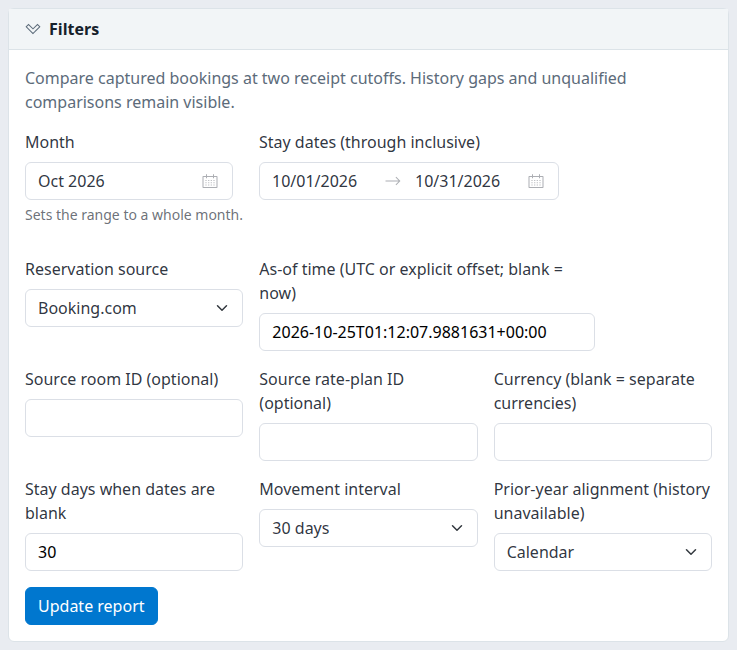
The Filters section after a report has loaded. The example selection does not establish that booking history is available for that source.
Keep the cutoff deliberate
A blank as-of becomes a fixed timestamp when the report runs. Refreshing that URL or changing an interval tab keeps the same cutoff. To obtain a new current cutoff, expand Filters, clear the as-of field and click Update report.
The five interval tabs choose which movement detail to inspect; the summary still shows all five windows. Choose the interval before refining the movement table, and recheck table filters after switching tabs.
Reset report starts a fresh selection for the current property. It is different from Reset table, which retains the report selection and clears movement-table search, filtering, sorting and paging choices.
Check the result
Read the property, source, stay dates, As-of and selected movement interval together. Then check History state before interpreting any number.
- Retained reconstruction; completeness unverified means the available retained versions could be compared. It does not certify continuous history or complete property coverage.
- Cutoff precedes the earliest retained receipt; an opening balance is unavailable means the report cannot establish the opening state. Dashes are not zero pickup. This can also appear when no retained receipt exists for the source.
- No retained stays match these filters means no captured stays matched the selected scope. It does not establish that the property had no bookings.
- No records to display in the movement table can mean no changed endpoint cells, or no rows matching its table filters. It is not proof that no reservation events occurred.
- Extracted is the query time, not the latest reservation receipt or proof of a fresh channel synchronization.
Inspect Earliest retained receipt, Latest retained receipt, Missing identity rows and Unusable receipt rows. These describe the selected source's retained data, not only the stay dates or products in your report. Zero diagnostic counts do not certify completeness.
What opening, closing and pickup mean
Closing is the captured booking state at the as-of cutoff. Opening is the state at the chosen number of days before it. The intervals are exact 24-hour periods in UTC, not property-local midnight boundaries.
For each booking, the report uses the highest retained version received on or before each cutoff. A provider's earlier edit time does not move a later-received change back into an earlier snapshot. Imports first appear when received, not at an inferred original sale time.
The report chooses the endpoint versions before applying stay and product filters. A cancellation or a move outside your selection does not make an older active version count again.
- Bookings counts booking identities contributing matching nights at the endpoint.
- Room stays counts contributing room-stay records, not occupied nights.
- Room nights counts nights inside the selected stay range. Arrival is included; checkout is excluded.
- Night change is closing nights minus opening nights. Moving a stay into or out of your selection can change this without a new sale or cancellation.
Movement detail compares endpoint states, not every event between them. Intermediate changes can cancel each other out. An unchanged endpoint can therefore have no movement row even when reservation activity occurred.
Movement classifications
A classification is selected for the booking's filtered endpoint changes and applied to its changed date/product cells. A row is not necessarily a separate booking or separate event.
| Movement | Meaning |
|---|---|
| First retained observation | There is no opening version and the closing version is not marked as an import. This is not proof of a new sale. |
| Imported first observation | There is no opening version and the closing version is marked historical/imported. |
| Reinstated | The booking changes from canceled to active. |
| Canceled | The booking changes from active to canceled; its opening nights are removed even if the cancellation has no room payload. |
| Date / room / rate / currency change (may include repricing) | Endpoint dates, source products, currencies or night counts differ. The same booking can also have price changes. A move across your filters may show only the entering or leaving side. |
| Price coverage changed | The date/product structure and night counts match, but the number of qualified priced nights changes. |
| Repricing | Remaining monetary changes where the structure and price-qualification counts match. |
Structural changes take precedence over price coverage and repricing. Do not interpret the absence of a separate Repricing label as proof that prices stayed unchanged.
Read the summaries
All movement windows
All movement windows; full selected-scope night counts shows:
| Column | Meaning |
|---|---|
| Window | 1, 3, 7, 14 or 30 days. These overlap; do not add them as independent production. |
| Opening | Opening cutoff timestamp, not the first booking receipt. |
| Opening nights / Closing nights | Selected room nights at those endpoints. |
| Change | Closing minus opening nights. |
| History state | Whether the comparison is available and its qualification or failure reason. |
Below it, the selected interval shows Bookings, Room stays, and Invalid room stays across both selected versions. The latter is not a unique issue count. These endpoint counts are different from the number of movement rows.
Currency totals
The Full-scope currency totals table retains the full report selection, regardless of movement-table filtering.
| Column | Meaning |
|---|---|
| Currency | Recorded currency, or Unknown. Currencies are not converted or combined. |
| Opening / closing nights | Endpoint nights in that currency. |
| Qualified nights | Opening and closing nights qualifying for the monetary calculation. |
| Opening known value / Closing known value | The known, qualified portion at each endpoint; these can be partial values. |
| Qualified value change | Difference only when all endpoint nights in the included rows have qualified prices. Otherwise unavailable. |
Only the ChannelRUSH Booking Engine source qualifies monetary values in this report. Other sources can provide room-night counts while their amounts remain unavailable.
A qualified night needs a recorded currency and exactly one nonblank recorded nightly price. Missing or duplicate price rows do not become zero prices. A recorded zero price can qualify, but qualification is not independent verification of its accuracy.
Amounts are booked nightly room-rate value, including tax already embedded in that rate and excluding separately recorded charges. They are not payments collected, realized revenue, profit or commission-adjusted net revenue.
A dash or blank amount means unavailable. Do not replace it with zero. A known endpoint amount can be partial even when displayed as a number; check qualified nights. Zero night change can still accompany a monetary change.
Stay-date / source-product breakdown
Expand Stay-date / source-product breakdown for the selected interval.
- Date / room / rate identifies the occupied night and source product, not its current standard-property mapping.
- Currency keeps monetary groups separate.
- Opening, First retained, Imported, Reinstated, Canceled, Date/room/rate changes, and Closing reconcile night counts. Cancellation changes are signed reductions.
- Qualified value change follows the price-coverage rules above.
The displayed breakdown is limited to its first 100 rows. Paging the separate movement table does not advance this breakdown. Use Legacy CSV for the complete date/product breakdown.
Prior-year pace
Prior-year pace displays the requested comparable stay dates and receipt cutoff, but the historical comparison remains unavailable. Calendar and Weekday change alignment only. Prior-year final production is not substituted for what was on the books at that earlier time. Do not treat unavailable figures as zero or assume another filter enables them.
Inspect and refine the movement table
The movements section contains changed date/product cells for the selected interval. It does not contain all opening and closing business.
- Confirm the opening and closing cutoffs above the table.
- Use Search to find source room IDs, source rate-plan IDs or movement labels. Search is case-insensitive; it does not search guest details, currencies, amounts, dates or reservation-version IDs.
- Use column sorting and filter controls to narrow supported fields. Text fields offer equality or contains matching; numeric fields offer equality or bounds; stay dates offer date comparisons. Identifier and currency filters use equality. Receipt/source timestamps are not sortable or filterable.
- Use the pager and Items per page for 25, 50 or 100 rows. The default is 100.
- Use Columns, column resizing/reordering, and Density to adjust presentation. These browser preferences do not change the underlying report or the standard download schema.
- Where a version link is available, open Opening version or Closing version to inspect its referenced retained reservation. Current reservation-access and password checks still apply.
Multiple column filters combine with AND. Unknown numeric values do not become zero and do not match a numeric comparison, including Not equal. Up to three sorts and ten column filters are supported; this table does not group rows.
The matching-movement totals cover all matching pages, not only visible rows. They still cover changed cells only, so they are not a replacement for the full-scope OTB totals above. Interactive table refinements work on the loaded movement data; they are not a new reservation-history query.
Movement column reference
| Column | What it identifies or measures |
|---|---|
| Stay date | Occupied night inside the report range. |
| Source room / Source rate plan | Recorded source product identifiers. A unique nightly rate-plan ID takes precedence over the room-stay plan; conflicting nightly IDs remain unknown. |
| Currency | Recorded currency; no conversion. |
| Movement | Endpoint classification described above. |
| Opening nights / Closing nights / Night change | This changed cell's endpoint room nights and their difference. |
| Opening qualified nights / Closing qualified nights | Endpoint nights qualifying for monetary calculations. |
| Opening known value / Closing known value | Qualified known portion, potentially partial. |
| Qualified value change | Difference only with complete qualified prices at both endpoints. |
| Opening version / Closing version | Retained reservation-version identities, not channel booking confirmation numbers. Opening can be blank when no opening version exists. |
| Opening receipt UTC / Closing receipt UTC | Receipt time of the selected version, not the report cutoff. |
| Closing source time UTC | Supporting source-edit time, where available. It does not decide receipt-cutoff eligibility. |
Download the right scope
Choose Download report for report-wide exports. Choose Download matching movements CSV or Download matching movements XLSX beside the table for its current matching selection.
| Download | Scope |
|---|---|
| Summary CSV / Summary XLSX | All five windows, grouped by currency. Ignores movement-table search, filters and paging. |
| Movements CSV / Movements XLSX | All changed cells in the selected movement interval, ignoring movement-table refinements. |
| Download matching movements CSV / XLSX | All movements matching table search, filters and sorting, across every page—not only the visible page. |
| Legacy CSV | All five windows' complete date/product/currency breakdown and movement detail in one file. Ignores table refinements and paging. |
Columns and column order are display preferences; ordinary downloads retain their standard fields. Whole-window booking and room-stay counts repeat on currency/detail rows: do not sum the repeated values. In Legacy CSV, do not add Summary and Movement rows together; they describe overlapping business at different levels.
Movement downloads are unavailable when the selected history window cannot be reconstructed. Summary and Legacy CSV retain unavailable-state markers. An available window with no movements yields a header-only movement CSV, not an invented zero movement row.
Downloads rerun the report at its selected cutoff. Their extraction time can differ from the screen, and retention changes or corrections can change a later reconstruction. Compare scope, cutoff and extraction time when reconciling files.
XLSX includes a Context sheet plus Summary or Movements. IDs remain text, date cells are dates, UTC timestamps are text and amounts/counts are numeric. Unavailable values are blank. CSV uses ISO dates and invariant numbers; formula-like text can carry a protective leading apostrophe. An empty movement CSV has headers but no data row carrying the repeated context fields.
Use New window to open the same selection without normal application navigation. Confirm the property, dates and cutoff there too. Daily OTB opens a separate report; it is not a continuation of all your pickup filters.
Filter reference
| Field | Values and behavior |
|---|---|
| Month | Fills a calendar month's stay dates. Run or update the report afterward. |
| Stay dates (through inclusive) | Both bounds or both blank; at most 93 inclusive days, ordered, in years 2000–2100. Checkout remains excluded from each stay. |
| Reservation source | One source. The initial choice prefers a connected booking engine; otherwise another connected source is selected. Verify it. |
| As-of time (UTC or explicit offset; blank = now) | Blank resolves to a fixed current cutoff on execution. Nonblank requires an explicit UTC offset or Z, at most 64 characters, not before 2000 or in the future. |
| Source room ID (optional) | Exact source ID, up to 200 characters. Blank means no room restriction. Spaces are significant. |
| Source rate-plan ID (optional) | Exact effective nightly source plan ID, up to 200 characters. Blank means no rate-plan restriction. Spaces are significant. |
| Currency (blank = separate currencies) | Recognized code such as USD; trimmed and uppercased. Blank retains separate currencies, not currency conversion. |
| Stay days when dates are blank | 1–93; default 30. Forward horizon from property-local today. Explicit dates take precedence. |
| Movement interval | 1, 3, 7, 14 or 30 days; default 7. Selects detail while the summary retains every window. |
| Prior-year alignment (history unavailable) | Calendar or Weekday; default Calendar. Changes proposed alignment, not historical availability. |
Export field reference
Header names below are exact. Modern Summary and Movements files begin with the common fields, then their dataset-specific fields. The workbook's Context sheet additionally explains selection and qualification.
Common modern fields
| Headers | Meaning |
|---|---|
contract |
Export-definition identifier, retained-receipt-pickup-export-v1. |
propertyId, feedId |
Selected property and source identities. |
stayStart, stayEnd |
Inclusive stay-date selection. |
asOfUtc, windowDays, openingUtc |
Closing cutoff, interval length and opening cutoff. |
extractedUtc |
This query's extraction instant; not source freshness. |
roomFilter, rateFilter, currencyFilter |
Applied report restrictions; blank means unrestricted. |
comparison |
Calendar/weekday alignment request, not proof a prior-year comparison ran. |
historyState, historyBasis, amountBasis |
Availability reason and qualifications for history and monetary interpretation. |
oldestReceipt, newestReceipt |
Feed-wide retained receipt limits, where available. |
missingIdentities, untimedRows |
Feed-wide diagnostics, repeated on data rows; do not sum. |
stlyState |
Explanation of same-time-last-year unavailability. |
Summary fields
| Headers | Meaning |
|---|---|
currency |
Currency group, possibly blank. |
openingNights, closingNights, nightChange |
Endpoint room nights and closing-minus-opening. |
openingQualifiedNights, closingQualifiedNights |
Nights with qualified recorded amounts. |
openingKnownValue, closingKnownValue, valueChange |
Known portions and fully qualified change. Blank is unavailable. |
openingWindowBookings, closingWindowBookings, openingWindowRoomStays, closingWindowRoomStays |
Whole-window counts repeated per currency row. Never sum across those rows. |
qualification |
Whether monetary change has complete qualified endpoint prices or remains unavailable. |
Unavailable windows have blank night/booking/stay counts. Available windows with no retained stays have zero counts but blank monetary values. Read history state before interpreting either.
Movement fields
| Headers | Meaning |
|---|---|
stayDate, room, ratePlan, currency, kind |
Date, source products, currency and movement label. |
openingNights, closingNights, nightChange |
Changed cell's endpoint nights and difference. |
openingQualifiedNights, closingQualifiedNights |
Changed cell's qualified nights. |
openingKnownValue, closingKnownValue, valueChange |
Known endpoint portions and qualified monetary change. |
openingVersionId, closingVersionId |
Supporting retained versions, not channel booking references. |
openingReceipt, closingReceipt, closingSourceEffective |
Selected version receipt/source lineage, in UTC; source time is not cutoff eligibility. |
qualification |
Monetary completeness qualification for the row. |
Legacy CSV fields
Legacy CSV uses different capitalization and combines breakdown and movement rows.
| Headers | Meaning |
|---|---|
Contract, PropertyId, SourceId |
Definition retained-receipt-pickup-v1 and selected identities. |
StayStart, StayEnd, AsOfUTC, WindowDays, OpeningUTC, ExtractedUTC |
Selection dates, cutoffs, interval and extraction instant. |
RoomFilter, RateFilter, CurrencyFilter, Comparison |
Report restrictions and requested prior-year alignment. |
HistoryBasis, State, AmountBasis |
Reconstruction, availability and monetary qualification. |
RowKind |
Summary, Movement, No retained stays in selected scope, or Unavailable. Summary here means date/product breakdown, not the modern currency summary. |
StayDate, Room, RatePlan, Currency |
Breakdown or movement cell identity. |
OpeningNights, ClosingNights, NightChange, OpeningQualifiedNights, ClosingQualifiedNights |
Cell counts and change. Blank on empty/unavailable marker rows. |
OpeningKnownValue, ClosingKnownValue, QualifiedValueChange |
Known portions and qualified monetary change. |
Movement, OpeningVersion, ClosingVersion, OpeningReceipt, ClosingReceipt, ClosingSourceEffective |
Movement category and lineage. Blank on Summary/marker rows means not applicable, not failed processing. |
OldestRetainedReceipt, MissingIdentityRows, UntimedRows, STLYState |
Repeated feed/history qualifications. |
OpeningBookings, ClosingBookings, OpeningRoomStays, ClosingRoomStays |
Repeated whole-window counts. Zero can be valid on available empty markers; blank denotes unavailable. Do not sum repeated counts. |
Common problems
- Opening balance unavailable: the cutoff precedes retained history, or no history is retained for that source. Confirm the source and try a shorter interval or later cutoff only if that answers your question. If usable history is still absent, ask support about retained coverage. Repeated runs cannot recreate missing history.
- Receipt timestamps, status or room dates prevent reconstruction: the report has rejected unusable retained evidence rather than returning partial totals. Some checks cover the broader source, so narrowing products may not remove the warning. Send support the property, source, stay dates, cutoff with time zone, interval and exact message. Do not edit bookings to suppress the warning.
- No stays or no movements: check the report selection first, then Reset table to remove table restrictions. Remember that unchanged endpoints can hide intermediate activity. Escalate expected missing business with the selected scope and relevant booking reference, without guest/payment details.
- Amounts are blank but nights exist: check the source, currency and qualified-night counts. Non-booking-engine sources do not qualify monetary values here. Unknown values are not zero; use a qualified accounting source for financial decisions the report cannot support.
- Dates or cutoff rejected: supply both stay dates, keep the range within 93 days and use a nonfuture as-of with Z or an explicit offset. Correct the field and run again. If a copied or manually altered URL fails, reopen through the report menu instead of changing unfamiliar query parameters.
- Report exceeds current limits: narrow the stay range and, where useful, source-product scope. Changing only the selected movement interval does not reduce all historical snapshots; narrowing one field may not resolve every bound. Contact support if a relevant bounded selection still fails. Do not assume a failed query returned complete totals.
- Screen and file differ: compare property, source, dates, cutoff, interval, extraction times and report-wide versus matching-table scope. Standard downloads ignore visible-column choices. If those agree but results still differ, provide the report URL and export context to support.
- Filters changed after switching interval tabs: recheck table search and filters, then apply them again. Choose the interval before refining the table.
Do not resend reservations, alter prices or submit operational changes to make report warnings disappear.
Related
- Analyze booking patterns, length of stay and seasonal trends — current captured production and receipt-window analysis, not historical OTB snapshots.