

General Settings
Additional Settings
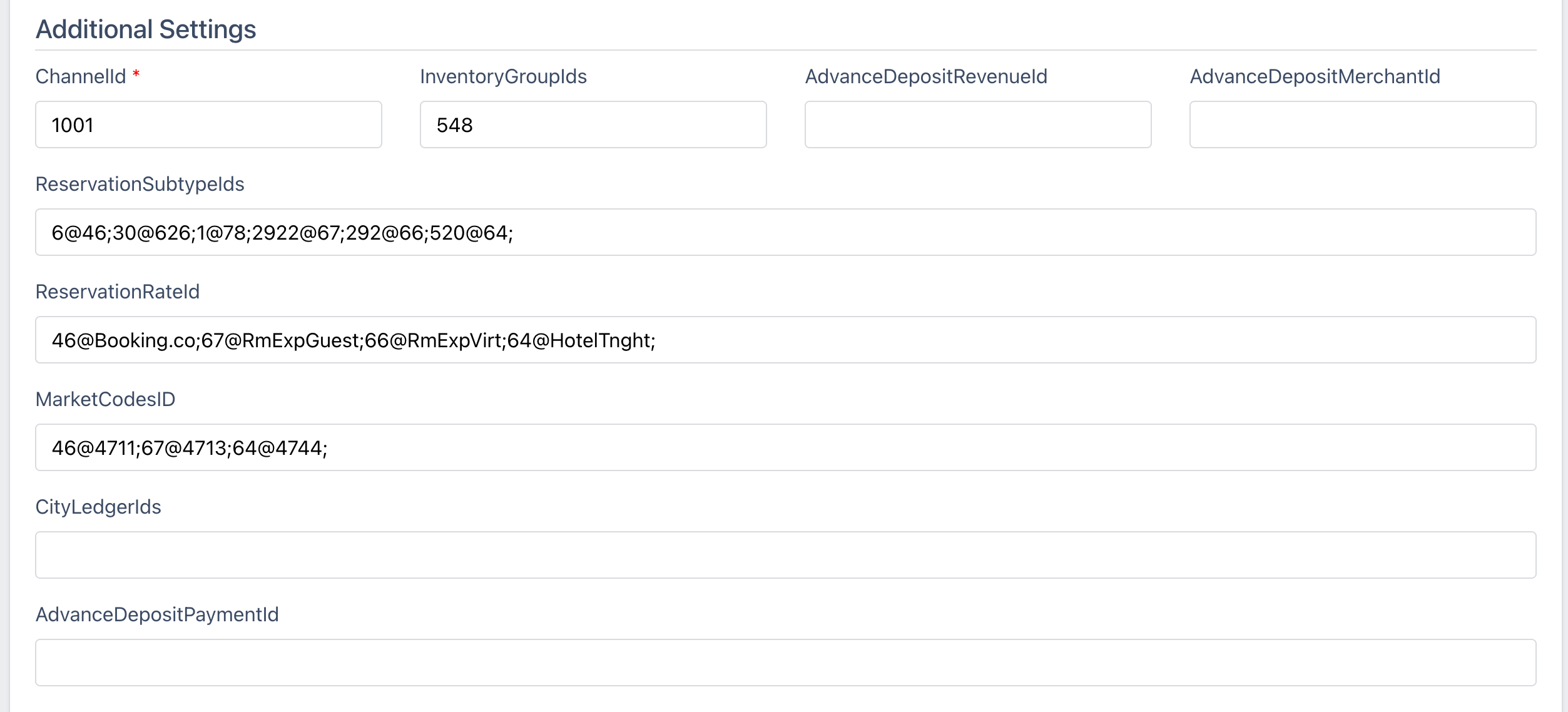
ChannelId
The SPI Channel ID that specifies ChannelRUSH as the company sending updates. Typically defaults to 1001.
InventoryGroupIds
This is the SPI Inventory Group ID from which you want to read availability/allocation and send it to the property's set of channels.
💡 454
You can list more than one SPI Inventory Group ID, and the availability/allocation will be combined.
💡 454;88;99
Inventory Group IDs - Cut Off Days
You can also specify a cutoff for each SPI Inventory Group, so allocation will only be read for the next number of days.
In the example below, for inventory group 454, all dates will be read (-1 signifies no cutoff, read all dates). Then, for inventory group 88, it will read and combine inventory for the next 30 days, and for inventory group 99, it will read and combine inventory for the next 7 days.
💡 454@-1;88@30;99@7
This allows you to open inventory groups for sale only within a specific window of their arrival date - i.e. if within 90 days, within 30 days, within 7 days, open the inventory for sale.
Inventory Group IDs - Date Ranges
ChannelRUSH now supports date-range inventory groups for SPI connections.
This feature allows you to configure different inventory groups to be active during specific periods of the year — ideal for seasonal inventory management, holiday periods, or promotional windows.
Date-Range Group
💡 9:{12/15-3/15}
Uses group 9 only for dates between December 15 and March 15 (winter season).
Date-Range Group with Cutoff
💡 9:{12/15-3/15}@30;123;
Uses group 9 for December 15 through March 15, with a 30-day booking window. Then group 123 for all other dates.
Note: Inventory Group IDs with overlapping date ranges will be combined/added together. Invenotry Group IDs without date ranges will be combined/added together. Otherwise if you have one date range Inventory Group ID and one regular non-date range Inventory Group ID, their allocation is not added together.
The date range applies to "stay dates", not "booking dates".
Priority Rules
When multiple groups are configured:
-
Date-range groups take priority for dates within their range
-
Default groups (no date range) fill in for dates not covered by any date-range group
-
Allocations are combined when multiple groups apply to the same date
Real-World Examples
Example 1: Seasonal Inventory
You have a winter inventory group (ID 9) and a default group (ID 187):
💡 9:{12/15-3/15};187;
Behavior:
-
Dec 15 – Mar 15: Inventory pulled from group 9
-
Mar 16 – Dec 14: Inventory pulled from group 187
Example 2: Multiple Seasons with Cutoffs
💡 9:{12/15-3/15}@30;15:{6/01-8/31}@60;187;
Behavior:
-
Winter (Dec 15 – Mar 15): Group 9, 30-day booking window
-
Summer (Jun 1 – Aug 31): Group 15, 60-day booking window
-
All other dates: Group 187, no cutoff
Example 3: Holiday Period Override
💡 22:{12/20-1/05};187@90
Behavior:
-
Holiday period (Dec 20 – Jan 5): Uses special holiday inventory group 22
-
All other dates: Uses group 187 with 90-day booking window
AdvanceDepositRevenueId
The SPI Advanced Deposit Revenue ID for reservations placed in SPI. Only one ID can be listed.
AdvanceDepositMerchantId
The SPI Advanced Deposit Merchant ID for reservations placed in SPI. Only one ID can be listed.
ReservationSubTypeIds
This maps the ChannelRUSH Channel ID to the SPI Reservation Subtype ID.
💡 6@34;
This would map the ChannelRUSH Channel ID 6 for Booking.com, to the SPI Reservation Subtype ID 34 representing Booking.com in SPI.
MarketCodesID
The SPI Market Code ID you want associated with each channel for reservations placed in SPI.
💡 -1@78;46@403;57@861;62@691;64@578;66@402;67@402;78@932;
In each pair (joined by @), the first value is the SPI Reservation Subtype ID and the second value is the Market Code ID you wish to map reservations from that channel to. See SPI ID Management & Mappings below for more information and examples.
-1 is a catch all - if a Resservation Subtype ID isn't set specifically, it will use the value joined with -1.
CityLedgerIds
The SPI City Ledger ID you want associated with each channel for reservations placed in SPI.
💡 -1@78;46@403;
In each pair (joined by @), the first value is the SPI Reservation Subtype ID and the second value is the City Ledger ID you wish to map reservations from that channel to. See SPI ID Management & Mappings below for more information and examples.
-1 is a catch all - if a Resservation Subtype ID isn't set specifically, it will use the value joined with -1.
AdvanceDepositPaymentId
The SPI Advanced Deposit Payment ID you want associated with each channel for reservations placed in SPI.
💡 -1@78;46@403;
In each pair (joined by @), the first value is the SPI Reservation Subtype ID and the second value is the Advanced Deposit Payment ID you wish to map reservations from that channel to. See SPI ID Management & Mappings below for more information and examples.
-1 is a catch all - if a Resservation Subtype ID isn't set specifically, it will use the value joined with -1.
ReservationRateId
The SPI Reservation Rate ID you want associated with each channel for reservations placed in SPI.
💡 -1@OTA;46@Bookingco;
In each pair (joined by @), the first value is the SPI Reservation Subtype ID and the second value is the SPI Reservation Rate ID you wish to map reservations from that channel to. See SPI ID Management & Mappings below for more information and examples.
-1 is a catch all - if a Resservation Subtype ID isn't set specifically, it will use the value joined with -1.
Room Type Settings
Additional Settings
LockOffRoomTypeIds
For lock-off rooms, you can set which SPI Room Type IDs to combine to create the inventory for the lock-off unit.
💡 44;47;99;
InventoryGroupIds
This field will override or replace the InventoryGroupIds set above at the channel/property level.
This allows you to specify SPI Inventory Group IDs specific to this room type.
It does not combine the inventory set at the channel/property level; it replaces what is put there for this room type.
You can also set cutoff day parameters here.
Rate Plan Settings
Additional Settings
ReservationRateId
This field will override or replace the ReservationRateId set above at the channel/property level.
This allows you to specify SPI Reservation Rate IDs specific to this room type.
MarketCodesID
This field will override or replace the MarketCodesID set above at the channel/property level.
This allows you to specify SPI Market Code IDs specific to this room type.
CityLedgerIds
This field will override or replace the CityLedgerIds set above at the channel/property level.
This allows you to specify SPI City Ledger IDs specific to this room type.
SPI ID Management & Mappings
Reservation Subtype IDs, Market Code IDs, etc
Learn how SPI Reservation Subtype IDs, SPI Reservation Rate IDs, SPI Market Codes, SPI, ando thers are mapped in ChannelRUSH.
SPI Reservation Subtype IDs
It starts with SPI Reservation Subtype IDs.
In SPI, these represent the channel where the reservation is created. We use those key-value pairs to map our Channel ID to the Reservation Subtype ID.
Here is an example: 6@46
So 6@46 map's our Booking.com ID 6 to the SPI Reservation Subtype ID 46.
Mapping Other SPI IDs
From here, we are mapping other SPI IDs to their corresponding SPI Reservation Subtype ID.
Using SPI Market Code IDs as an example, 46@370 maps SPI Reservation Subtype ID 46 to SPI Market Code ID 370.
Then we have the complete end-to-end mapping from the OTA to ChannelRUSH to SPI Reservation Subtype ID to Market Code ID.
💡 Booking.com → ChannelRUSH (Booking.com ID: 6) → SPI Reservation Subtype ID: 46 → SPI Reservation Market Code → 370
For other SPI IDs, you match up the 'Reservation Subtype ID@SPI ID'—so for the CityLedgerID, 62@472, we pair the Reservation Subtype ID 62 with the SPI City Ledger ID 472.
See 'Mappings- Other' below for the list of IDs and their names.
ChannelRUSH Channel IDs
You can find the ChannelRUSH Channel ID by the following methods:
- On the 'Mappings - Other' page listed at the top under 'ChannelRUSH Channel IDs'
- On your 'Admin -> Settings -> Channels'
- By going to 'Org Admin -> Property Edit -> Channels'.
For the last two, the ID listed on the left on the list of channels is the ChannelRUSH Channel ID.
Mappings - Other
On the SPI Channel Settings page click on 'Mappings - Other'.

This will load the following page that has a list of all of the SPI IDs and their names for things like City Ledger IDs, Market Code IDs, etc.
Click the link at the top right to pull down a list of IDs and names configured in SPI for this property.
SPI Support
SPI Support
spisupport@spiinc.com
SPI Support Customer Portal
https://spisoftware.atlassian.net/servicedesk/customer/user/login?destination=portals
Phone
Support: 305-209-8104
Office: 305-209-1408
Sales: 305-209-1420
FAQ
How to correct the SPI GetRoomRateID_Default error message.
💡 SPI SpiErrorMessage
GetRoomRateID_Default. Active RoomRate not setup for channel. Unable to save reservation room. General error. Conversion from type 'DBNull' to type 'Integer' is not valid.
When this error is encountered when trying to send a reservation from ChannelRUSH to SPI, the ReservationRateId needs to be changed in ChannelRUSH's SPI settings, or the ReservationRateId needs to be re-created in SPI to match ChannelRUSH's SPI Settings.
We match SPI's ReservationSubTypeID for the channel the reservation was booked under, with the ReservationRateID found in SPI.
Changing the ReservationRateID in SPI
This can only be set when creating the rate plan in SPI (once created, it can't be changed) - so you will have to mark the rate plan as inactive, then create a new rate plan for that channel with the correct ReservationRateID (aka short code).
Changing the ReservationRateID in ChannelRUSH
The 'ReservationRateId' field can be found in the ChannelRUSH SPI settings, under the 'Additional Settings' section.
No GDSGroupRate is setup with these parameters
What to do when you encounter the error message "When you encounter the error message: No GDSGroupRate is setup with these parameters."
When pulling mappings or rates, you might encounter the following error message.
💡
[
{
"Id": "2450",
"Message": "No GDSGroupRate is setup with these parameters. Details: InterfaceId: ApiUsername, ResortId: 1234",
"IsSystemMessage": false,
"DataInfo": null,
"Type": 5
}
]
This means there is no inventory block for the rate configured for the API to read.
You can configure this under the
Setup -> Property Management -> ResortOwner/Guest Connect
GDS setting
From there, you add the inventory block and the rate for the specific resort.